Your team just got budget approval to build an AI copilot.
Leadership wants “ChatGPT for our internal tools.” Engineering wants to ship fast. Compliance wants control.
Then someone asks: “How do we actually build this?”
Here’s what most teams discover:
An AI copilot isn’t just an LLM API call. It’s an architectural decision that affects performance, cost, security, and whether your copilot hallucinates or actually helps users.
Embedded copilots behave differently than API-based ones. Agent-based architectures scale differently than simple prompt-response systems. And the wrong choice means rebuilding in 6 months.
This guide shows you the 3 core architecture patterns for AI copilot systems, when to use each one, and a decision framework, so you pick the right pattern for your use case.
Let’s start with what actually matters.
What Is an AI Copilot? (Architecture Definition)
An AI copilot is an AI system that assists users with tasks in real-time, typically embedded in existing workflows rather than being a standalone chatbot.
Key characteristics:
Context-Aware: Copilots understand what the user is working on (current document, code file, customer record).
Action-Oriented: They don’t just answer questions, they suggest actions, generate content, automate steps.
Workflow-Embedded: They appear where users work (IDE, CRM, document editor, support tool).
Interactive: Multi-turn conversations that refine output based on user feedback.
AI Copilot vs Chatbot vs Agent
| Type | Context | Actions | Autonomy | Example |
|---|---|---|---|---|
| Chatbot | None or minimal | Answer questions only | Zero | FAQ bot |
| AI Copilot | Full workflow context | Suggest and generate | Low (user approves) | GitHub Copilot, custom AI solutions |
| AI Agent | Environment context | Execute autonomously | High (acts independently) | Autonomous email responder |
This article focuses on copilot architecture – systems that assist but don’t act independently.
The 3 Core AI Copilot Architecture Patterns
Every AI copilot follows one of three architectural patterns. Each has different trade-offs for performance, cost, and control.
Architecture 1: Embedded Copilot (Client-Side Intelligence)
What it is: AI model runs in the user’s environment (browser, desktop app, mobile device).
Architecture diagram:
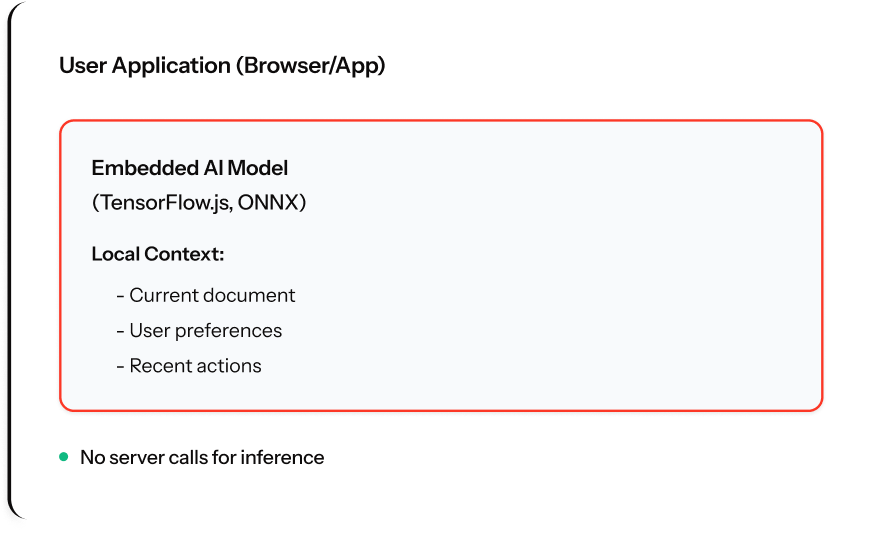
How it works: Small models run locally. Browser/app downloads model once, runs inference client-side.
When to use: Privacy-critical (healthcare, legal), offline-first apps, ultra-low latency (<50ms), high-volume simple tasks.
Example use cases: Code autocomplete, grammar checking, form auto-population, real-time validation.
Trade-offs:
- Zero latency, works offline, no API costs, complete privacy
- Limited model size, device-dependent, updates require app updates, not for complex reasoning
Implementation: 2-4 weeks using TensorFlow.js, ONNX Runtime, or Core ML.
Architecture 2: API-Based Copilot (Server-Side Intelligence)
What it is: AI model runs on cloud servers. Application sends context via API, receives suggestions.
Architecture diagram:
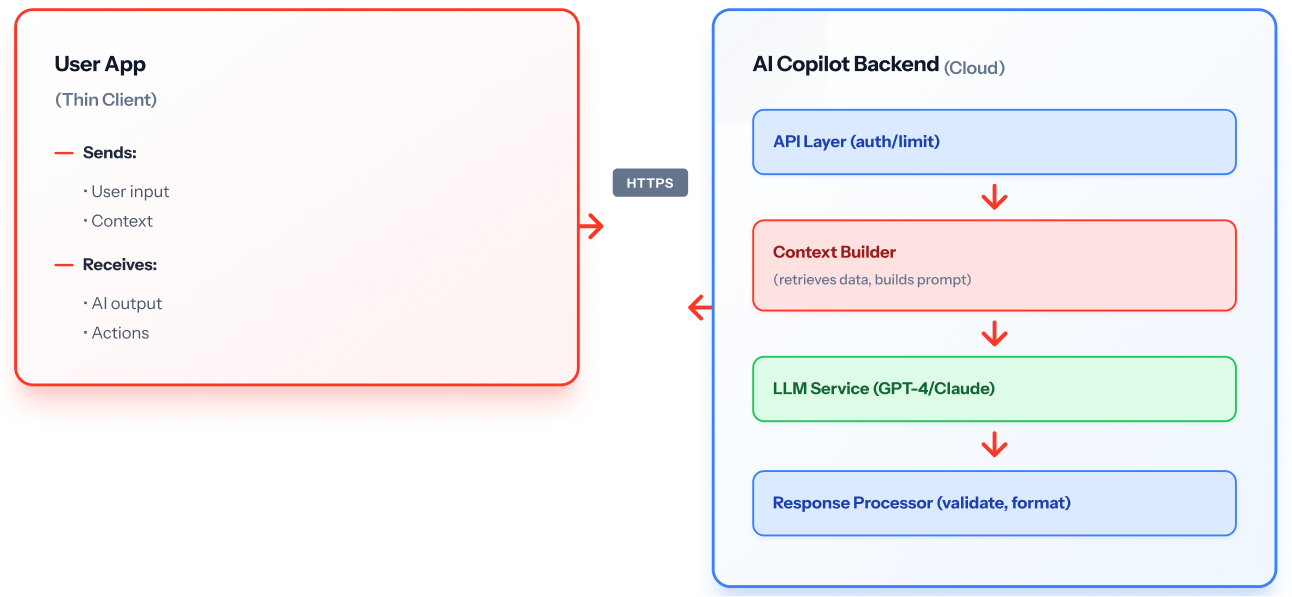
How it works: User app sends requests to backend API. Backend builds context, calls LLM, validates response, returns to user.
When to use: Complex reasoning requiring GPT-4 class models, dynamic context from databases, centralized control, enterprise features (audit, compliance).
Example use cases: Customer support copilot (needs CRM data), sales email generator, code review assistant, report generation.
Trade-offs:
- Most powerful models, centralized updates, full observability, backend system integration
- Network latency (200-2000ms), per-request costs, requires internet, data leaves device
Implementation: 4-8 weeks including backend, API integration, observability.
Architecture 3: Agent-Based Copilot (Autonomous Intelligence)
What it is: AI copilot that plans, uses tools, and executes multi-step workflows with minimal user intervention.
Architecture diagram:
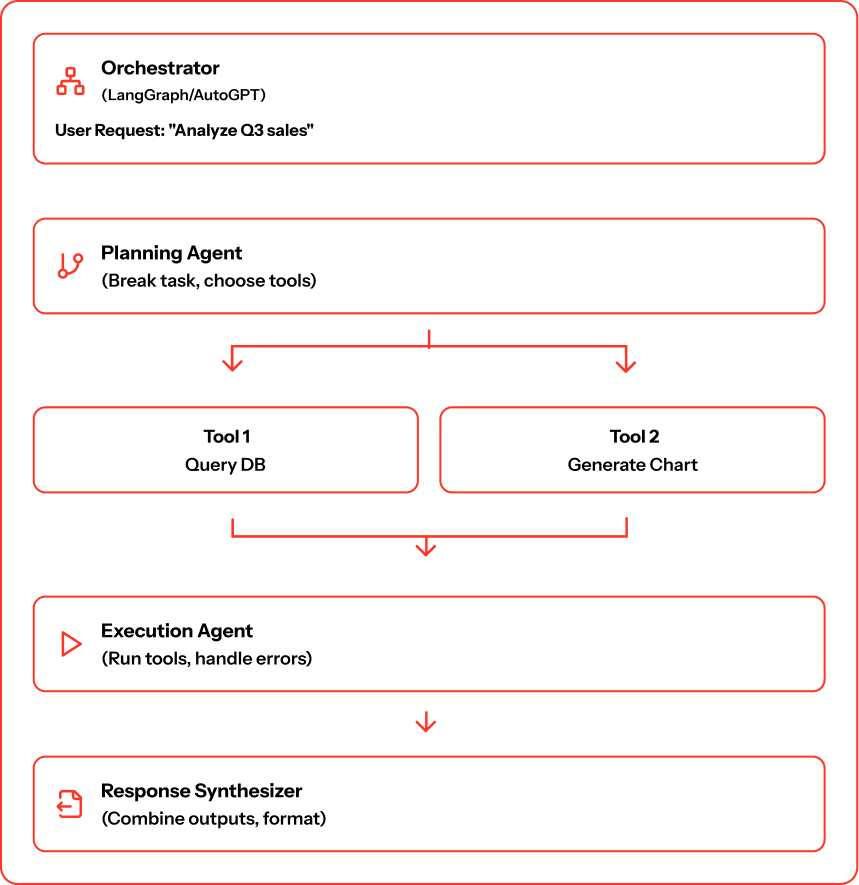
How it works: User gives high-level goal. Agent breaks into steps, decides tools, executes the workflow, handles errors, and returns result.
When to use: Multi-step workflows coordinating across systems, complex decision-making, variable task paths, research and analysis requiring multiple data sources.
Example use cases: Competitive research copilot, data pipeline builder, customer onboarding assistant, code migration tool.
Trade-offs:
- Handles complex workflows autonomously, recovers from failures, scales to many decision points, user gives goal
- Highest complexity, unpredictable costs (agent decides calls), requires robust guardrails, harder to explain
Implementation: 8-16 weeks including framework, tool integration, orchestration, extensive testing.
Architecture Comparison: Which Pattern Fits Your Use Case?
Here’s how the three architectures compare across key dimensions:
| Dimension | Embedded | API-Based | Agent-Based |
|---|---|---|---|
| Latency | <50ms | 200–2000ms | 2–30 seconds |
| Model Power | Small (millions of parameters) | Large (billions of parameters) | Large + tool use |
| Complexity | Low | Medium | High |
| Privacy | Highest (data never leaves device) | Medium (data sent to server) | Medium (data sent to server) |
| Cost per Request | $0 (after model deployment) | $0.001–0.10 | $0.05–1.00+ |
| Offline Support | Yes | No | No |
| Use Case Complexity | Simple (autocomplete, suggestions) | Medium (generation, analysis) | Complex (multi-step workflows) |
| Control | Low (model in user’s hands) | High (you control prompts, model) | Medium (agent makes decisions) |
| Typical Build Time | 2–4 weeks | 4–8 weeks | 8–16 weeks |
Security & Compliance by Architecture Pattern
Every AI copilot architecture has different security implications. Enterprise buyers need to understand what data goes where.
Data Flow & Privacy
Embedded Architecture: Highest security – Data never leaves user’s device
- No network transmission of sensitive information
- Ideal for HIPAA, GDPR, legal compliance
- Model updates require app deployment (can’t patch remotely)
API-Based Architecture: Medium security – Data sent to your servers
- You control the infrastructure and access
- Requires encryption in transit (TLS) and at rest
- Need audit logs for compliance (who accessed what data?)
Agent-Based Architecture: Complex security – Data flows through multiple systems
- Agent tools may access external APIs or databases
- Requires comprehensive logging of all tool calls
- Harder to guarantee data doesn’t leave your environment
Compliance Requirements by Industry
| Industry | Recommended Architecture | Key Requirements |
|---|---|---|
| Healthcare (HIPAA) | Embedded or Private API | PHI never leaves controlled environment, audit trails, encryption |
| Financial Services | API-Based with strict governance | SOC 2, data residency, transaction logs, access controls |
| Legal | Embedded preferred | Attorney-client privilege, documents stay local |
| Enterprise SaaS | API-Based or Agent | SSO/SAML, role-based access, multi-tenancy isolation |
| Government | Embedded or on-prem API | FedRAMP, air-gapped deployment options |
Key Security Questions Before You Build
- Where does user data go? (Device, your cloud, third-party LLMprovider?)
- How is data encrypted? (In transit, at rest, in processing?)
- Who can access AI-generated content? (User only, admins, stored for training?)
- What happens to data after processing? (Immediatelydeleted, logged for audit, retained?)
- Can you prove compliance? (Audit trails, data lineage, access logs?)
For regulated industries (healthcare, financial services), work with data governance experts before choosing architecture.
Decision Framework: Choosing Your AI Copilot Architecture
Use this framework to pick up the right architecture.
Step 1: Define Core Task
- Autocomplete/Suggestions → Embedded
- Generate content from data → API-based
- Execute multi-step workflows → Agent-based
Step 2: Evaluate Privacy Requirements
- Data can’t leave device → Embedded or ensure governance for API/Agent
- Regulated but manageable → API-based or Agent with audit trails
- No restrictions → Any architecture
Step 3: Assess Latency Tolerance
- <100ms required → Embedded only
- <500ms acceptable → API-based
- 2-5 seconds acceptable → Agent-based
- 10+ seconds acceptable → Agent-based with progress indicators
Step 4: Consider Model Complexity
- Simple pattern matching → Embedded (TinyLlama, Phi-3)
- Complex generation/summarization → API-based (GPT-4, Claude)
- Multi-step reasoning, tool use → Agent-based (orchestration frameworks)
Step 5: Evaluate Budget and Scale
- <$1K/month, <10K requests/day → Embedded
- $1K-20K/month, 10K-1M requests/day → API-based
- $20K+/month, high volume or complex → Agent-based or optimized API-based
Step 6: Architecture Decision Tree

Implementation Best Practices for AI Copilot Architecture
Regardless of architecture, these practices prevent common failures:
- Build Observability First: Log every request/response, track latency/errors, monitor user feedback, measure completion rates. Use LangSmith, W&B, or MLOps platforms
- Implement Guardrails: Validate AI output against schema, check for PII/sensitive data, reject rule violations, test with adversarial inputs. Example: validate SQL before execution, check emails for offensive language
- Start Simple: Phase 1 (4-6 weeks) – Single-turn API copilot
- Phase 2 (8-12 weeks): Multi-turn with memory.
- Phase 3 (12-16 weeks): Agent capabilities.
Validate adoption before adding complexity.
- Control Costs: Cache common queries, limit context window size, use cheaper models for simple tasks, and implement rate limiting. For agents: set max tool calls, define per-workflow budgets, and use streaming.
- Plan for Model Changes: Abstract model calls, version prompts, A/B test changes, have fallback to previous model if new degrades.
5 Common Pitfalls in AI Copilot Architecture
Most AI copilot projects fail for predictable reasons. Avoid these mistakes.
Pitfall 1: Starting with Agent Architecture
The mistake: Team sees demos of autonomous agents and jumps straight to agent-based architecture for a simple use case.
Why it fails: Agent architectures are 3-4x more complex than API-based. Most copilot use cases don’t need autonomous decision-making.
The fix: 80% of teams should start with API-based architecture. Add agent capabilities only after validating simpler patterns work.
Example: A customer support copilot that drafts responses doesn’t need agent architecture – API-based copilot with CRM context is sufficient.
Pitfall 2: Ignoring Context Window Limits
The mistake: Sending entire conversation history plus documents to LLM on every request. Context window fills up. Copilot “forgets” early conversation.
Why it fails: GPT-4 has 8K-128K token limits. Average conversation exceeds this after 10-15 turns. Copilot suddenly can’t reference earlier decisions.
The fix: Implement context management strategy. Summarize old messages. Keep only last N turns plus critical context. Use vector database for relevant document retrieval, not full text.
Example: GitHub Copilot doesn’t send your entire codebase – just relevant files based on what you’re editing.
Pitfall 3: No Fallback Strategy When LLM APIs Fail
The mistake: 100% dependency on external LLM API. When OpenAI/Anthropic has an outage, your copilot is completely down.
Why it fails: LLM APIs have 99%+ uptime, but outages happen. Users expect copilot to degrade gracefully, not crash entirely.
The fix: Build fallback tiers. (1) Primary model (GPT-4), (2) Backup model (Claude or GPT-3.5), (3) Degraded mode (cached responses or simpler local model), (4) Error message with manual option.
Example: “AI copilot is temporarily unavailable. You can still use manual search or try again in a few minutes.”
Pitfall 4: Underestimating Token Costs
The mistake: Prototyping with unlimited budget. Not tracking per-request costs. Shipping to production. Discovering $50K/month API bill.
Why it fails: Agent architectures specially make unpredictable numbers of LLM calls. 1,000 users x 10 requests/day x $0.10/request = $30K/month.
The fix: Track token usage from day one. Set budgets per user or per workflow. Use cheaper models for simple tasks (GPT-3.5 is 20x cheaper than GPT-4). Implement caching aggressively.
Cost monitoring table:
| Architecture | Typical Cost per 1K Users | Primary Cost Driver |
|---|---|---|
| Embedded | $0–500/month | Infrastructure only |
| API-Based | $5K–20K/month | LLM API calls |
| Agent-Based | $15K–50K+/month | Multiple LLM calls per task |
Pitfall 5: Building What Engineers Want, Not What Users Need
The mistake: Engineers build a technically impressive copilot with 50 features. Users ignore it and stick to old manual workflows.
Why it fails: Users don’t want “AI” they want to complete tasks faster. If a copilot doesn’t save time in their actual workflow, adoption fails.
The fix: Start with ONE high-frequency task users already do manually. Make copilot 10x faster for that task. Measure adoption. Then expand to other tasks.
Example: Instead of “AI copilot for all customer support tasks,” start with “AI drafts response to refund requests.” Optimize one workflow first.
Validation metrics:
- 60%+ of users try the copilot in first week
- 30%+ use it daily after 30 days
- Users complete target task 5x+ faster with copilot
If you’re not hitting these, your copilot isn’t solving a real problem.
How Pendoah Helps Build Production AI Copilots
Building an AI copilot is straightforward in demos. Production is harder: architecture decisions, integration, observability, cost control, and governance.
Pendoah works with mid-market and enterprise teams to design and build copilot AI applications that scale.
What We Provide
Architecture Design & Technical Strategy (Weeks 1-2)
Assess your use case against the 3 architecture patterns:
- Design hybrid architectures when needed
- Plan data engineering requirements for context
- Model cost and performance trade-offs
- Create technical specifications and roadmap
Custom AI Development & Implementation (Weeks 3-12)
Through AI staff augmentation, we provide:
- ML engineers who build and optimize copilot backends
- Full-stack developers who integrate copilots into your applications
- MLOps specialists who implement observability and monitoring
- AI governance expertise for regulated industries
Post-Launch Optimization
- Monitor performance and user satisfaction
- Optimize prompts and reduce costs
- Implement MLOps AI operations best practices
- Expand capabilities based on usage patterns
Ready to Build Your AI Copilot?
The right AI copilot architecture depends on your use case, constraints, and scale.
- Embedded architecture gives you speed and privacy
- API-based architecture gives you power and control
- Agent-based architecture gives you autonomy and complexity
Most production systems combine patterns embedded for fast interactions, API for complex tasks, agents for workflows.
Start With an AI Copilot Assessment
Schedule Your Free AI Architecture Consultation
In 45 minutes, we’ll:
- Understand your copilot use case and constraints
- Recommend the optimal architecture pattern
- Estimate timeline, cost, and resource needs
- Discuss integration with your existing systems
Or Get an AI Readiness Assessment
We’ll evaluate:
- Your data readiness for AI copilot context
- Infrastructure gaps for production deployment
- Team capabilities and training needs
- Compliance and governance requirements
The Future of AI Copilot Architecture
The industry is evolving from simple prompt-response systems toward sophisticated agent architectures that handle entire workflows.
Forward-thinking AI copilot architectures recognize:
- Hybrid patterns win: Combine embedded speed with API power
- Context is everything: Copilots need rich, real-time context to be useful
- Observability is required: You can’t improve what you can’t measure
- Cost management matters: Uncontrolled LLM costs can exceed copilot value
The best copilot AI systems aren’t built on hype. They’re built on deliberate architecture decisions that balance user experience, technical constraints, and business objectives.
Design deliberately. Build iteratively. Measure constantly.