
Legacy APIs slow everything down.
Your team spends 60% of their time maintaining integrations instead of building new features. Modern applications can’t access legacy data in real-time. And every integration with those outdated interfaces, SOAP, XML, proprietary protocols, becomes a multi-week project.
Most companies try to replace the entire legacy system. Big-bang rewrite. 12-18 months. Millions of dollars. And a 60% failure rate.
Here’s a better approach:
Strategic API integration patterns that solve specific bottlenecks without replacing everything.
In this guide, you’ll learn 5 proven patterns we’ve used in production, including StatSafe, where we connected a legacy healthcare database to modern natural language interfaces in 12 weeks.
For each pattern, you’ll see the specific bottleneck it solves, how it works, when to use it, and implementation timeline.
Let’s dive in.
Pattern 1: API Gateway Pattern
The Bottleneck It Solves
Your legacy APIs are being hit from everywhere.
Web apps. Mobile apps. Third-party integrations. Internal tools. Each client connects directly to legacy endpoints.
Result? Uncontrolled access. No rate limit. Security nightmares. Zero visibility into who’s using what.
Here’s the worst part:
When one client misbehaves, infinite retry loops, missing rate limits, it takes down the legacy system for everyone.
Do you want to add authentication? You’d have to modify every legacy endpoint. Assuming you even have access to the source code.
The API Gateway pattern solves this with a single entry point in front of your legacy APIs.
How It Works
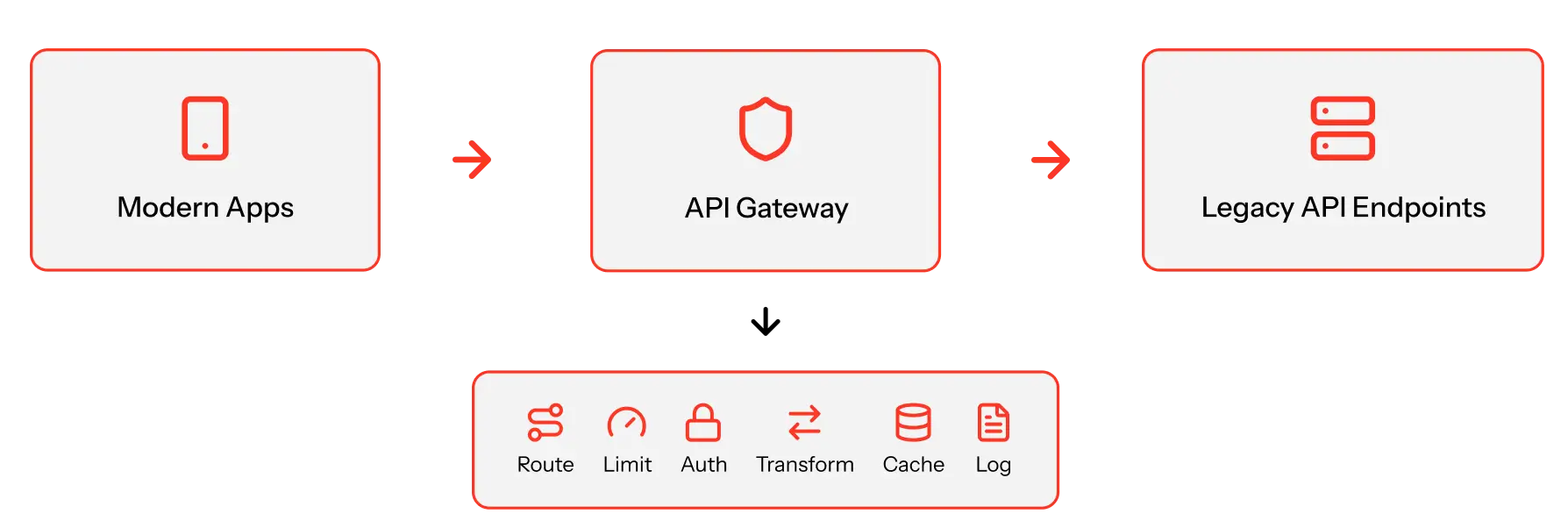
Instead of clients calling legacy APIs directly, they call the API Gateway.
The gateway handles:
- Request Routing: Directs traffic to appropriate legacy endpoints
- Rate Limiting: Prevents any client from overwhelming legacy systems
- Authentication & Authorization: Centralizes security without touching legacy code
- Protocol Translation: Accepts REST, calls legacy SOAP endpoints
- Response Transformation: Converts legacy XML to modern JSON
- Caching: Reduces load for repeated requests
- Monitoring & Logging: Provides visibility you never had
The architecture:
When to Use This
Use the API Gateway pattern when:
- Multiple clients access the same legacy APIs
- Legacy APIs have no built-in rate limiting or auth
- You need features (caching, logging) without modifying legacy code
- You want to gradually migrate clients to new APIs behind the scenes
The result?
Immediate control and visibility. Without touching legacy systems.
Implementation: 2-4 weeks using managed services (AWS API Gateway, Azure API Management, Kong).
Pattern 2: Adapter/Wrapper Pattern
The Bottleneck It Solves
Your legacy APIs speak language, modern applications don’t understand.
SOAP with WS-Security when your React app expects REST. Proprietary XML schemas when JSON works. Stateful sessions when your microservices are stateless.
Every new integration means writing translation code. That code lives everywhere: frontend, backend services, duplicated across teams.
Here’s the problem:
When the legacy API changes, you hunt down every translation layer and update it. Which takes weeks.
The Adapter pattern creates a unified modern interface that wraps all that legacy complexity.
How It Works
You build an adapter service between modern applications and legacy APIs.
The adapter:
- Exposes modern REST APIs matching current standards (JSON, HTTP verbs, stateless)
- Translates internally to whatever legacy needs (SOAP, XML, sessions)
- Handles legacy quirks (weird error codes, inconsistent naming, undocumented behavior)
- Provides consistent responses even when legacy returns chaos
- Centralizes complexity so modern apps never see legacy details
The architecture:

When to Use This
Use the Adapter pattern when:
- Legacy APIs have fundamentally different interfaces than modern standards
- Multiple teams need to integrate with the same legacy system
- You want to hide legacy complexity from modern developers
- Legacy API documentation is poor or non-existent
StatSafe example:
We wrapped a legacy SQL Server database with no API layer at all. The adapter service accepted natural language queries via REST, translated them to validated SQL, executed against the legacy database, and returned clean JSON.
Modern applications have a clean REST API. The legacy database? Never changed.
The result:
New team members integrate with legacy systems in hours instead of weeks.
Implementation: 3-6 weeks per adapter service.
Pattern 3: Strangler Fig Pattern
The Bottleneck It Solves
You can’t replace your legacy system in one shot.
Too risky. Too expensive. Too disruptive.
But you also can’t keep building on it. Every new feature increases technical debt.
Here’s the dilemma:
The business needs new capabilities now. They can’t wait 12 months for a complete rewrite.
The Strangler Fig pattern lets you gradually replace legacy functionality with modern services while keeping everything running.
How It Works
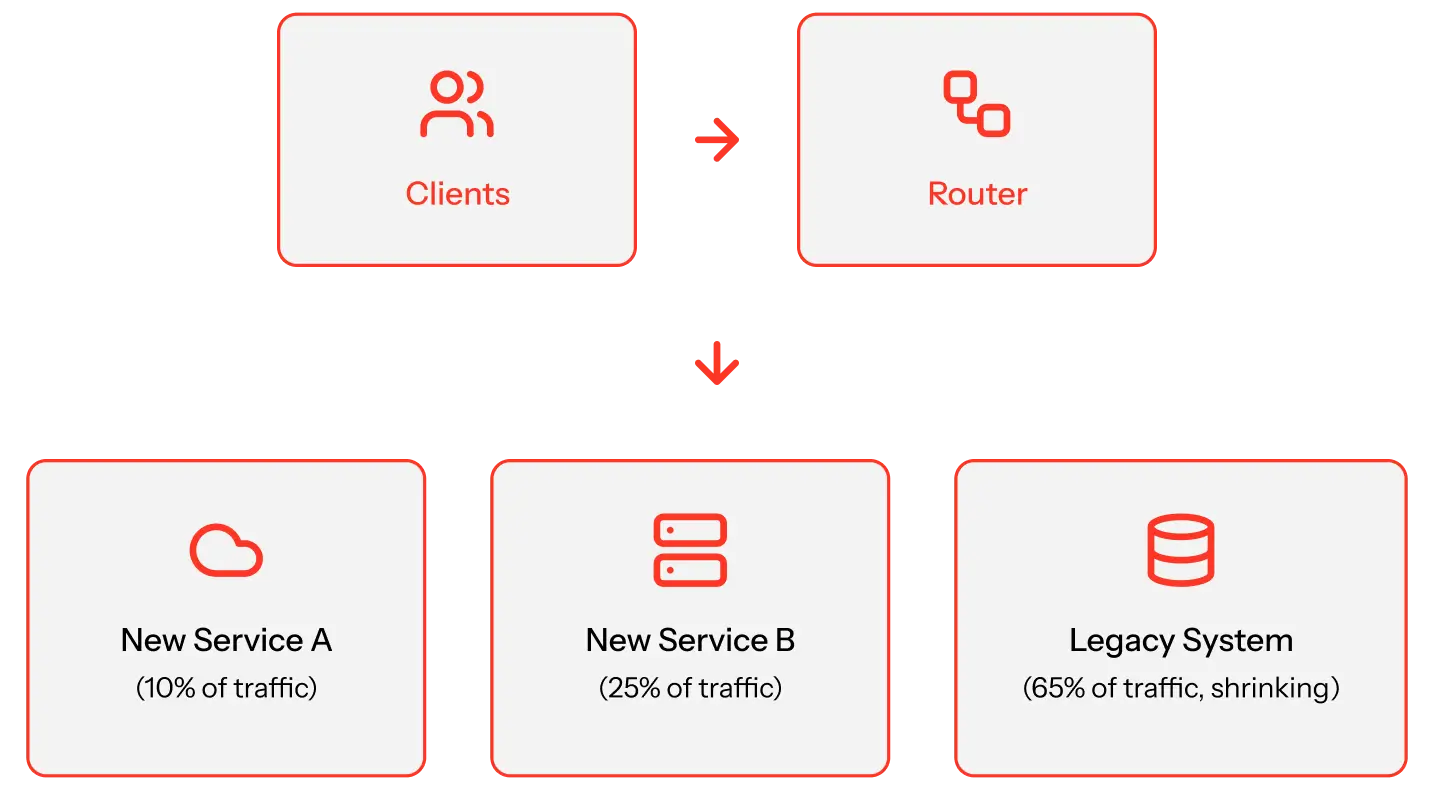
Named after the strangler fig tree that grows around its host, this pattern wraps the legacy system and selectively routes requests.
Phase 1: Intercept
Place a routing layer in front of the legacy system. Initially, all traffic flows to legacy.
Phase 2: Replace Incrementally
Build new services for specific features. Update routing rules to direct those requests to new services.
Phase 3: Strangle
As more features move to new services, legacy handles less traffic. Eventually, it serves a small subset, or nothing.
The architecture:
When to Use This
Use the Strangler Fig pattern when:
- You need to replace legacy but can’t afford downtime
- You want to deliver new features while modernizing
- Business can’t wait for a complete rewrite
- You need to prove value incrementally
The approach:
Start with the highest-value, lowest-risk feature. Build it as a new service. Route 10% of traffic to test. Gradually increase. Once proven, move to the next feature.
The result:
Continuous delivery of value. No big-bang risk.
Implementation: 6-18 months for complete migration. But new features ship every 2-4 weeks.
Pattern 4: Event-Driven Integration
The Bottleneck It Solves
Your legacy systems are tightly coupled through synchronous API calls.
System A needs data from System B? It calls directly and waits.
The problem?
When System B is down, System A fails. When System B is slow, System A times out.
Scaling becomes impossible. Everything depends on everything else. Adding a new system means updating 5 others with new API calls.
Every integration creates another failure point.
Event-driven integration decouples systems through asynchronous events and message queues.
How It Works
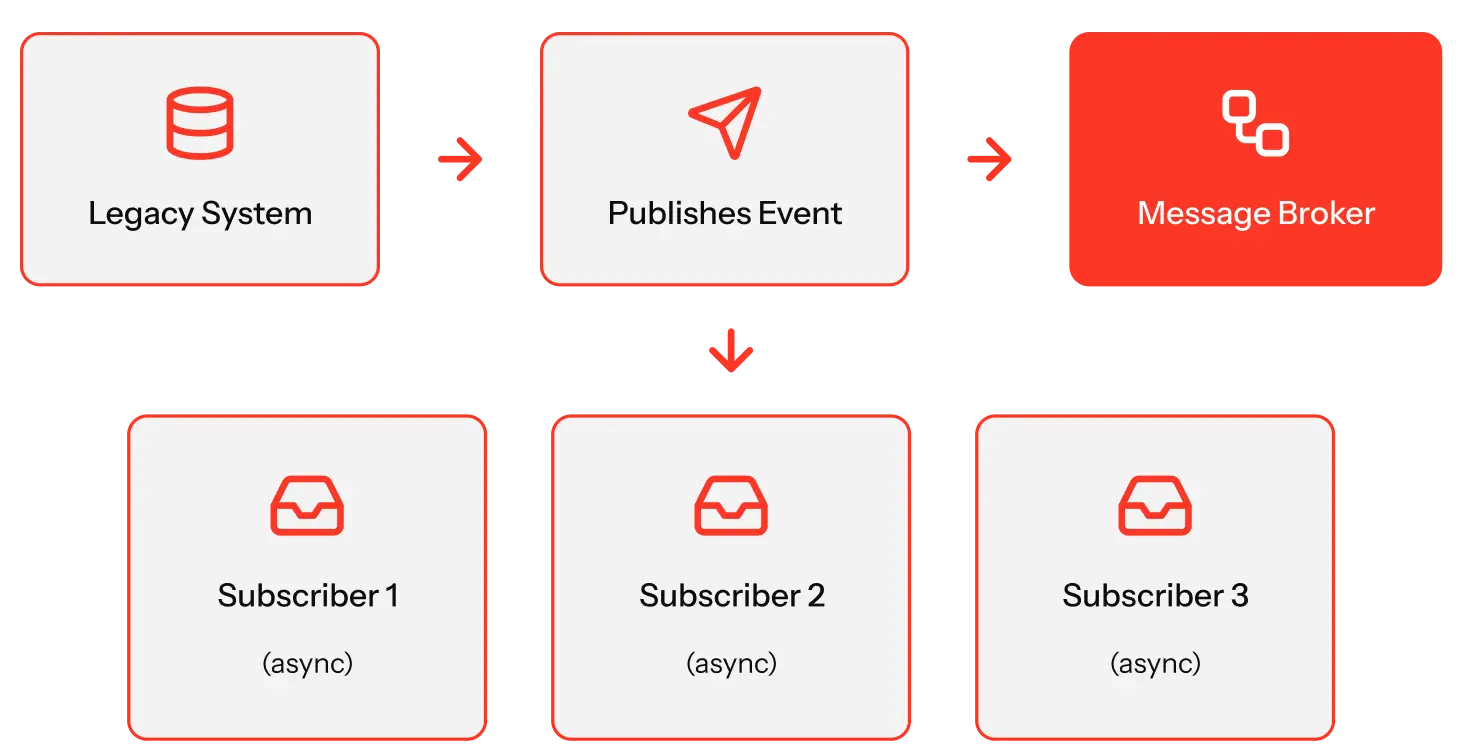
Instead of systems calling each other directly, they publish and subscribe to events.
Publisher (Legacy System):
When something happens, order placed, user updated, payment processed, publish an event to a message broker.
Message Broker:
Stores events in durable queues (Kafka, RabbitMQ, AWS SNS/SQS, Azure Service Bus).
Subscribers (Modern Systems):
Listen for relevant events and react independently. If a subscriber is down? Events wait in the queue.
The architecture:
When to Use This
Use event-driven integration when:
- Systems fail or slow down frequently, taking others with them
- You need to add functionality without modifying legacy systems
- You want real-time data flow without tight coupling
- Legacy systems can’t handle modern request volumes
Here’s the best part:
You can add event publishers to legacy systems even if you can’t modify them.
Use database triggers that publish events when data changes. Or log file monitoring that converts entries to events. Or API polling that checks for changes. Or Change Data Capture tools that track database changes.
The result:
Resilient integrations. No cascade failures. Systems scale independently.
Implementation: 4-8 weeks for event infrastructure, 1-2 weeks per integration.
Pattern 5: Change Data Capture (CDC)
The Bottleneck It Solves
Your legacy database holds critical business data. But modern applications can’t access it efficiently.
Legacy apps write to the database directly. Modern apps need the same data in real-time.
But here’s the problem:
You can’t add APIs to the legacy database. Polling every minute kills performance. Batch exports run overnight, by the time data reaches your new apps, it’s stale.
And direct database access from modern apps? Violates security policies.
Change Data Capture (CDC) streams database changes to modern systems in real-time. Without touching legacy code.
How It Works
CDC tools monitor transaction logs in your legacy database.
When data changes, inserts, updates, or deletes, CDC captures the change and publishes it as an event to downstream systems.
The architecture:
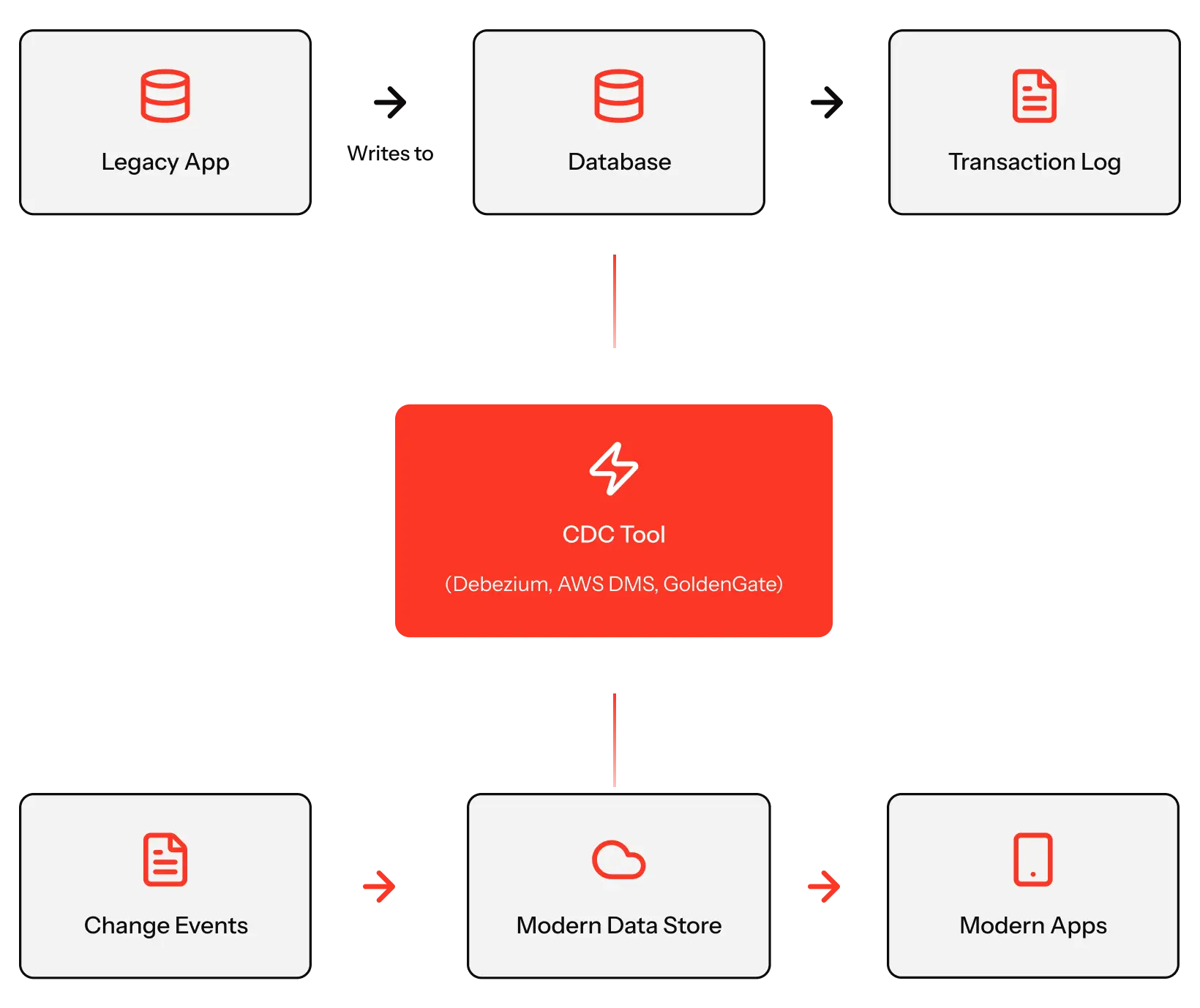
The key advantages:
Zero Legacy Modification: CDC reads transaction logs. Legacy apps and databases don’t change.
Real-Time Sync: Changes appear in modern systems within seconds.
Complete History: You see every change, not just the current state. Enable audit trails.
Decoupled Access: Modern apps never touch the legacy database. Better security. Less load.
When to Use This
Use CDC when:
- Legacy databases contain data modern apps need in real-time
- You can’t modify legacy applications
- Polling or batch exports are too slow
- You’re building modern data infrastructure without disrupting legacy systems
StatSafe example:
We used CDC-like extraction to sync legacy pharmacy data into a modern layer optimized for natural language queries.
The legacy system kept writing data exactly as before. StatSafe reads from the modern layer, which stayed in sync automatically.
The result:
Modern applications get real-time legacy data. Without legacy system changes.
Implementation: 2-6 weeks depending on database complexity.
Choosing the Right Pattern: Trade-offs and Selection Guide
You can’t use every pattern everywhere.
Here’s how to choose based on your specific bottleneck.
Decision Framework
| Bottleneck | Use (Pattern) | Trade-off | Don’t use if |
|---|---|---|---|
| Uncontrolled legacy API access | API Gateway Pattern | Adds network hop (~20–50 ms latency), but gains control and visibility | Legacy API already has built-in rate limiting and auth |
| Incompatible legacy API interfaces | Adapter / Wrapper Pattern | Extra service to maintain, but hides complexity from teams | Legacy API already uses modern REST / JSON standards |
| Need to replace legacy gradually | Strangler Fig Pattern | Temporary complexity running old and new together, but avoids big-bang risk | You can afford complete system replacement in one deployment |
| Tight coupling causing cascade failures | Event Driven Integration | Eventual consistency — data is not instant, but gains resilience | You need strong consistency and cannot tolerate any delay |
| Cannot access legacy database in real time | Change Data Capture (CDC) | Requires transaction log access, but provides real-time sync | Overnight batch processing is acceptable and real-time data is not required |
Pattern Combinations
You don’t choose just one.
Most legacy modernization strategies combine multiple patterns.
Common combination 1: API Gateway + Adapter
Gateway provides control and routing. Adapters handle protocol translation.
Together: controlled access to modernized interfaces.
Common combination 2: Strangler Fig + Event-Driven
Strangler strategy for replacing features. Event-driven for decoupling new services.
Together: incremental modernization without tight coupling.
Common combination 3: CDC + API Gateway + Adapter
CDC syncs legacy data to modern stores. Adapter wraps modern store in clean APIs. Gateway controls access.
Together: real-time legacy data access through modern interfaces.
StatSafe used this stack:
- API Gateway (FastAPI) for routing and orchestration
- Adapter pattern (custom SQL wrapper) for legacy database interface
- CDC-like approach (schema indexing) for legacy metadata extraction
Result: Modern natural language interface on legacy SQL Server database.
Implementation Timeline Comparison
| Pattern | Complexity | Timeline | Maintenance |
|---|---|---|---|
| API Gateway | Low | 2–4 weeks | Low (managed) |
| Adapter/Wrapper | Medium | 3–6 weeks | Medium |
| Strangler Fig | High | 6–18 months | High (dual systems) |
| Event-Driven | Medium | 4–8 weeks | Medium |
| CDC | Medium | 2–6 weeks | Low |
Risk vs. Value
Lowest Risk, Quick Wins:
Start with API Gateway (immediate control) or CDC (real-time data access). Both deliver value in weeks without legacy system changes.
Medium Risk, High Value:
Adapter pattern or Event-Driven Integration. Require new services but don’t touch legacy code. Deliver significant architectural improvements.
Highest Risk, Transformative Value:
Strangler Fig for complete legacy replacement. It takes months but enables full modernization.
Mid-market recommendation:
Start with 2 quick wins (Gateway + CDC or Adapter). Prove value. Then tackle long-term modernization (Strangler Fig).
How StatSafe Bridged Legacy Healthcare Data
Let’s look at a real implementation that combines multiple patterns.
The Challenge
A healthcare provider needed to give clinical staff natural language access to patient data locked in a legacy SQL Server database.
Constraints:
- Can’t replace the database (other systems depend on it)
- Can’t modify legacy applications (too much risk in healthcare)
- HIPAA compliance required (full audit trail, data security)
- Non-technical users need simple interface (no SQL knowledge)
The Solution: Pattern Combination
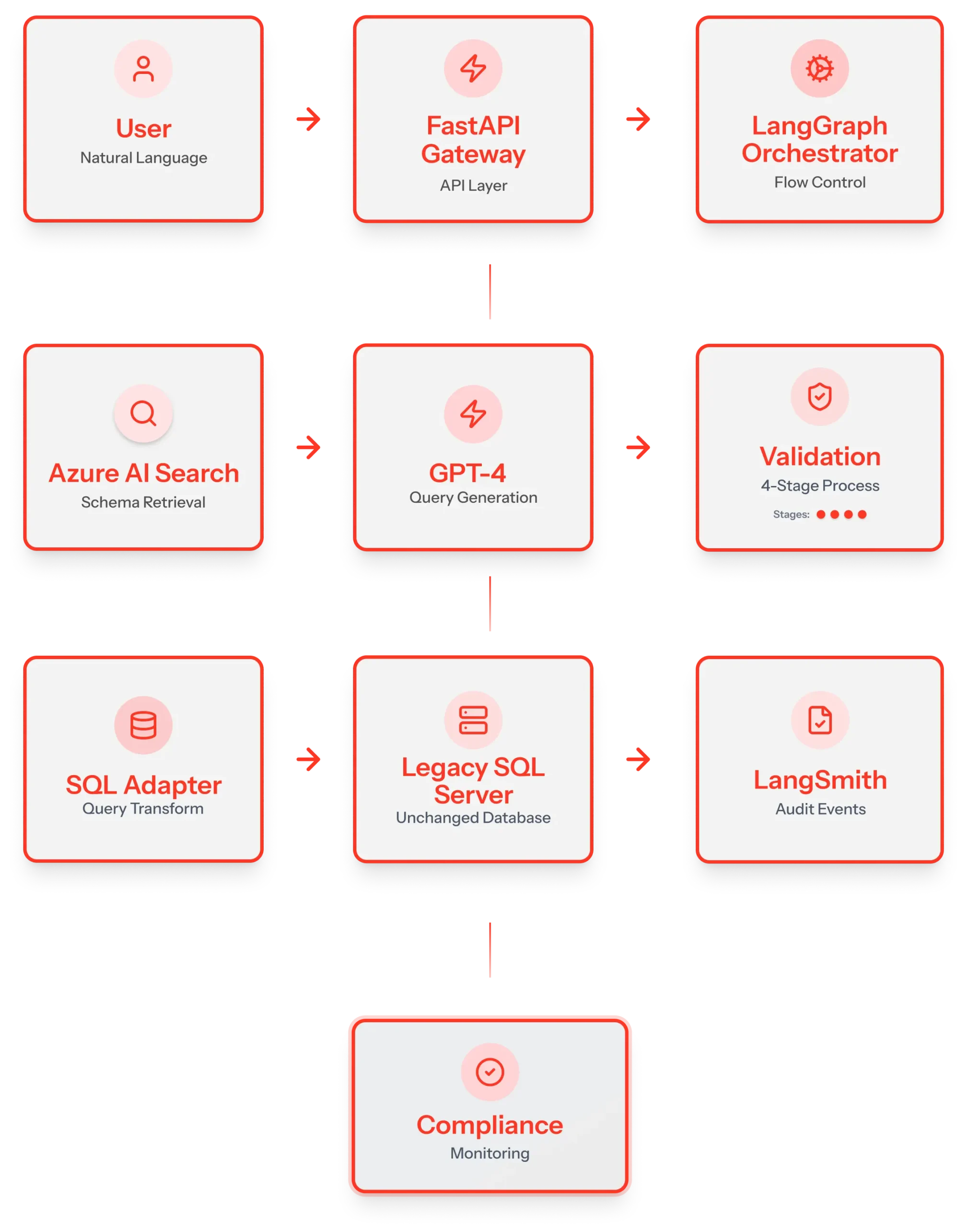
Pattern 1: API Gateway (FastAPI)
Entry points for natural language queries. Handles authentication, routing, and orchestration. Single control point for all database access.
Pattern 2: Adapter Pattern (Custom SQL Wrapper)
Wrapped the legacy database in a modern interface. Accepted validated SQL queries, executed safely, and returned to clean JSON. Legacy databases are never exposed directly.
Pattern 3: CDC-Inspired Schema Extraction
Used Azure AI Search to index database schema (tables, columns, relationships). Enabled context-aware query generation without repeatedly querying database structure.
Pattern 4: Event-Driven (for Monitoring)
All queries logged as events to LangSmith for audit trail. Asynchronous monitoring didn’t impact query performance.
The Architecture
The Results
Technical outcomes:
Zero changes to legacy database or dependent systems. Real-time query execution (2-3 seconds end-to-end). Full HIPAA compliance with complete audit trail. Multi-layer validation prevents invalid queries.
Business outcomes:
Clinical staff access data without SQL knowledge. The IT team freed us from constant “run this query” requests. Compliance teams have full visibility in data access. Foundation for future modernization.
Patterns proved their value:
API Gateway gave control we didn’t have. Adapter pattern hid legacy complexity. Schema extraction enabled intelligent query generation. Event-driven monitoring provided audit without performance impact.
Timeline: 12 weeks from concept to production. Zero legacy system downtime.
Making Legacy APIs Work with Modern Applications
Legacy API bottlenecks don’t always require complete system replacement. The 5 integration patterns covered solve specific problems:
- API Gateway Pattern → Centralized control over unmanaged legacy APIs
- Adapter/Wrapper Pattern → Modern interfaces for outdated protocols
- Strangler Fig Pattern → Incremental replacement without big-bang risk
- Event-Driven Integration → Decoupled systems that don’t cascade failures
- Change Data Capture → Real-time legacy data access without code changes
StatSafe proved these patterns work in production. We connected a legacy SQL Server database to a natural language interface in 12 weeks using four patterns together.
Implementation Requires Data Engineering
Here’s what most teams discover: Integration patterns depend on solid data infrastructure.
- For API Gateway: You need documented API contracts and data models.
- For Adapter/Wrapper: You need legacy data structures mapped to modern formats.
- For Strangler Fig: You need data migration strategy and dual-write patterns.
- For Event-Driven Integration: You need defined event schemas and reliable data pipelines.
- For Change Data Capture: You need transaction log access and target data stores designed for your patterns.
Every pattern requires a data engineering foundation.
Assessment: Which Patterns Fit Your Bottlenecks?
We’ll help you:
- Identify which bottlenecks are blocking your integrations
- Determine which patterns solve your specific problems
- Map the data infrastructure you need before patterns work
- Design an 8-12 week implementation roadmap
Pattern Selection Guide
Includes:
- Pattern selection decision tree
- Data engineering prerequisites per pattern
- Implementation timeline estimates
- API integration examples from real projects