
The app development process turns a business problem into software that real users can rely on.
Coding is one stage of that process.
Before development begins, the team must define the problem, understand the users, set scope boundaries, design the workflow, select an architecture, and determine how success will be measured.
After coding begins, the work still requires testing, release planning, monitoring, support, and ongoing improvement.
Skipping these decisions rarely saves time. It moves uncertainty into later stages, where changes affect more of the product and cost more to correct.
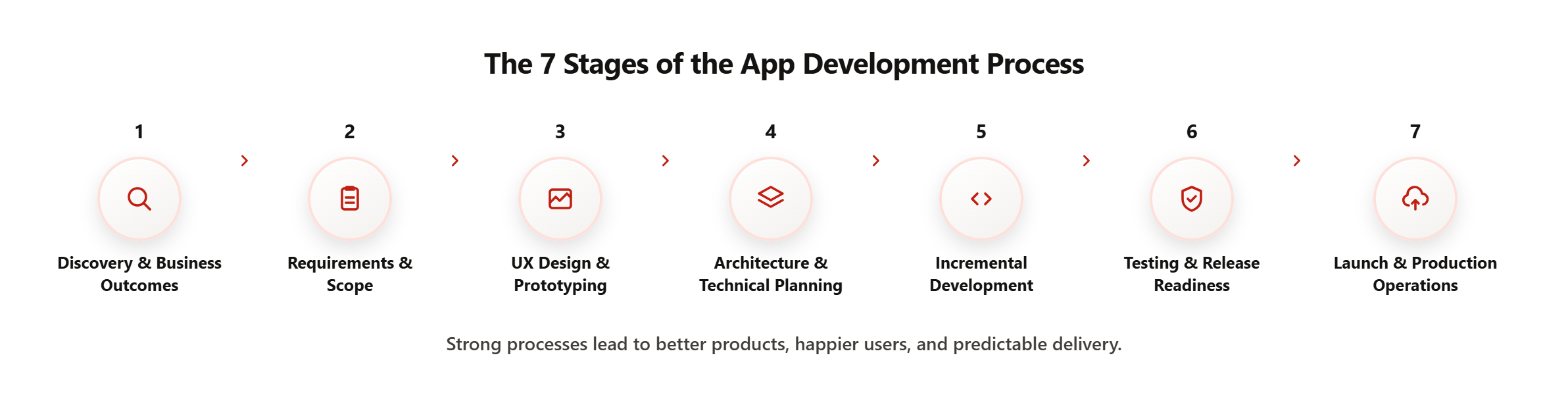
A practical app development process contains seven stages:
- Discovery and business outcomes
- Requirements and scope
- UX design and prototyping
- Architecture and technical planning
- Incremental development
- Testing and release readiness
- Launch and production operations
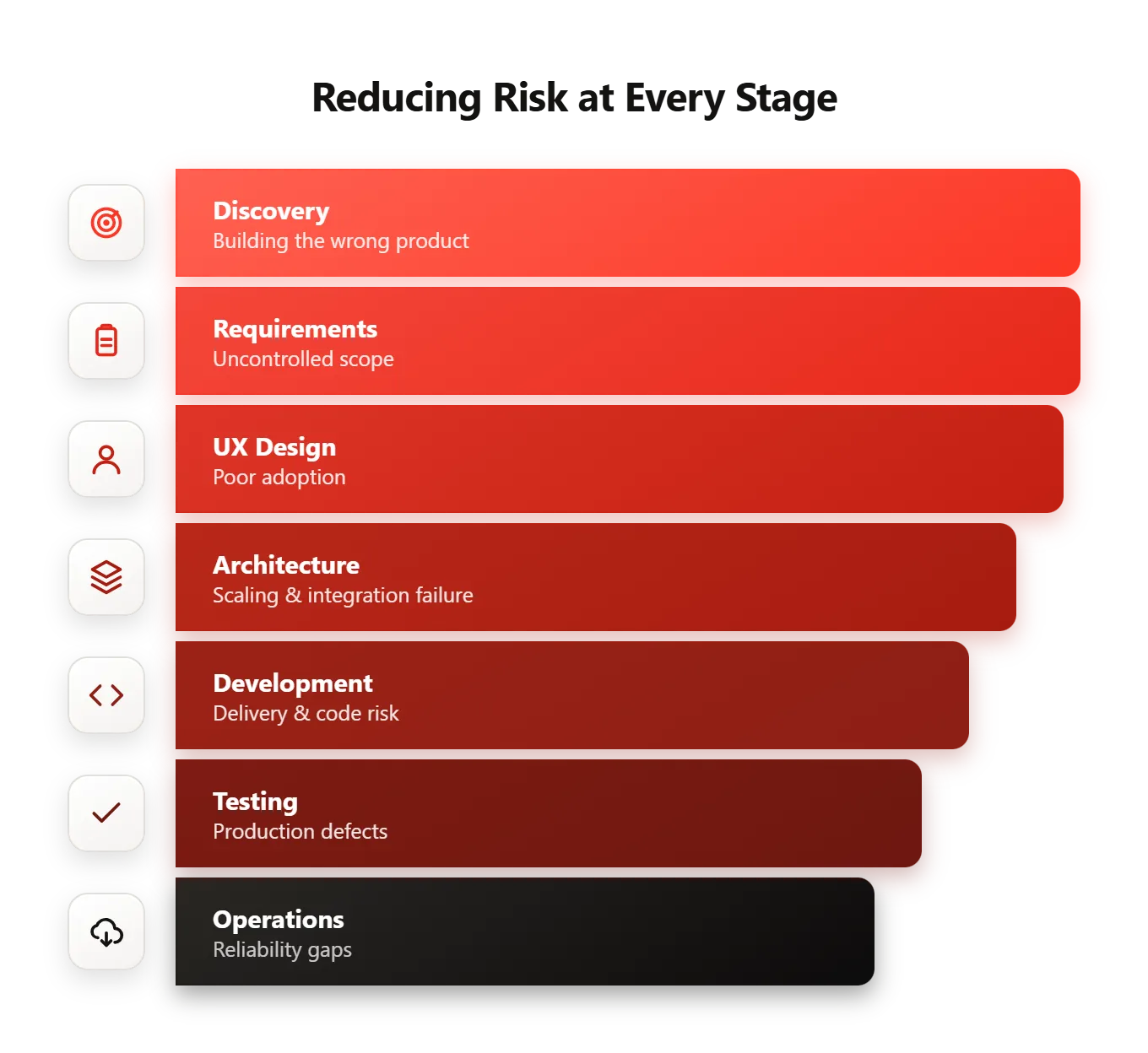
Each stage should reduce a specific risk before the organization commits more budget and time.
The App Development Process at a Glance
| Stage | Core decision | Primary output | Risk reduced |
|---|---|---|---|
| Discovery | What problem should the app solve? | Business outcome and user definition | Building the wrong product |
| Requirements | What must the product do? | Scope, journeys, and acceptance criteria | Uncontrolled scope |
| UX design | How will users complete the task? | Tested prototype and interface direction | Poor adoption |
| Architecture | How should the system work? | Technical blueprint and security model | Scaling and integration failure |
| Development | How will the product be delivered? | Working product increments | Delivery and code-quality risk |
| Testing and release | Is the application ready for real use? | Test evidence and launch plan | Production defects |
| Operations | Can the team support and improve it? | Monitoring, ownership, and product data | Reliability and maintenance gaps |
The process is not perfectly linear.
User testing may expose missing requirements. An integration may force an architecture change. Production feedback may reshape the roadmap.
Strong teams manage these changes through defined decisions rather than allowing the product to drift informally.
Stage 1: Discovery and Business Outcomes
App development should begin with the business problem, not the feature list.
A request such as “we need a customer app” does not explain:
- Which customer problem needs to be solved
- Who the application is for
- What users do today
- Why the current process is inadequate
- Which business result should improve
- How the organization will measure success
A stronger starting point might be:
Customers currently call or email to request appointments. Staff manually confirm availability, enter information into the scheduling system, and send updates. The application should allow eligible customers to select an available service, confirm an appointment, and receive status updates without manual coordination.
This description gives the product team something concrete to investigate.
The team can now measure:
- Appointment completion rate
- Staff time per booking
- Scheduling errors
- Customer response time
- Support volume
- Cancellation rate
Pendoah’s software development services follow this outcome-first model. Product definition, architecture, engineering, and deployment remain connected throughout delivery instead of being treated as separate vendor handoffs.
Our Fast AI ROI guide shows how to define baselines, success measures, and time-to-value expectations before development begins.
What discovery should establish
Discovery should answer:
- What problem is the organization solving?
- Who experiences the problem?
- Which workflow exists today?
- Who owns the outcome?
- Which constraints affect delivery?
- Which systems must the application connect to?
- Which security or compliance requirements apply?
- What result would justify the investment?
The team should also identify what the application will not address.
Clear exclusions protect the project from becoming a collection of loosely related requests.
Discovery outputs
A focused discovery stage may produce:
- Business problem statement
- User and stakeholder map
- Current workflow
- Success measures
- Initial scope
- Constraints and assumptions
- Integration inventory
- Risk register
- Decision log
Discovery is complete when leadership, product, design, and engineering share the same understanding of why the product should exist.
Stage 2: Requirements and Scope
The second stage converts the business outcome into product behavior.
Requirements should explain what users need to accomplish, what the system must enforce, and how the team will confirm that the work is complete.
A vague requirement might state:
Users can manage appointments.
A testable requirement describes the workflow:
- The user signs in.
- The system confirms eligibility.
- The user selects a service.
- The application retrieves available times.
- The user confirms a time.
- The scheduling system creates the appointment.
- The application displays confirmation.
- A notification is sent.
- Failed bookings enter a defined recovery path.
The detailed version reveals several requirements that the vague statement hides:
- Authentication
- Eligibility rules
- Scheduling integration
- Transaction handling
- Notifications
- Error recovery
- Confirmation evidence
Functional requirements
Functional requirements describe what the application does.
Examples include:
- Create an account
- Search for a service
- Upload a document
- Complete a payment
- Submit a request
- Approve a transaction
- Track an order
- Receive a notification
Nonfunctional requirements
Nonfunctional requirements describe how the product must perform.
These may include:
- Security
- Performance
- Availability
- Accessibility
- Scalability
- Privacy
- Auditability
- Recovery
- Device support
- Data retention
These requirements shape architecture and testing. They should not appear for the first time near launch.
Roles and permissions
The team should define which users can view, create, modify, approve, or delete information.
A multi-sided application may include:
- Customer
- Service provider
- Operations administrator
- Finance administrator
- Support agent
- Organization owner
Permissions are product requirements, not only backend implementation details.
Edge cases
Requirements must cover more than the ideal user journey.
Common edge cases include:
- Duplicate submissions
- Invalid information
- Failed payments
- Expired sessions
- Interrupted connections
- Missing documents
- Conflicting records
- Unauthorized actions
- Integration timeouts
- Unavailable services
An application that supports the normal path and ignores predictable failures is not production-ready.
Acceptance criteria
Acceptance criteria create a shared definition of completion.
For example:
When an eligible customer confirms an available appointment, the application creates one booking, displays the confirmed time, stores the transaction identifier, and sends the required notification.
Developers use the criteria to implement the feature.
Quality assurance uses the same criteria to test it.
The buyer uses them to decide whether the deliverable is accepted.
Stage 3: UX Design and Prototyping
User experience design determines how people understand and complete the workflow.
Visual styling matters. Workflow clarity matters more.
A polished interface cannot compensate for unclear navigation, missing information, weak error handling, or unnecessary steps.
Map the user journey
The team should define the complete journey for each important user outcome.
Examples include:
- Registration
- Booking
- Checkout
- Document submission
- Approval
- Password recovery
- Subscription cancellation
- Support escalation
Each journey should include:
- Entry point
- Required information
- Decisions
- Success state
- Failure state
- Recovery path
Create wireframes
Wireframes show layout, hierarchy, and interaction before the team invests in detailed visual design.
They help answer:
- Is the next action clear?
- Is the required information visible?
- Does the user understand the current status?
- Are there unnecessary fields?
- Can the workflow work on smaller screens?
- What happens when no data is available?
Test a prototype
An interactive prototype allows users and stakeholders to experience the workflow before engineering begins.
Prototype testing can expose:
- Confusing terminology
- Missing actions
- Weak navigation
- Incorrect assumptions
- Excessive steps
- Accessibility problems
- Differences between stakeholder expectations
The prototype does not need to simulate every function.
It should test the highest-risk user journeys and product assumptions.
Design for accessibility
Accessibility should be included in the product requirements and design system.
The Web Content Accessibility Guidelines 2.2 provide recommendations covering keyboard access, distinguishable content, input assistance, focus behavior, and understandable interactions across web and mobile experiences.
Design reviews should consider:
- Screen-reader labels
- Keyboard and switch navigation
- Text scaling
- Color contrast
- Touch-target size
- Focus order
- Form instructions
- Error identification
- Alternative text
- Motion and animation
Accessibility testing should continue during development. It should not be limited to a final design review.
UX deliverables
The design stage may produce:
- User journeys
- Information architecture
- Wireframes
- Interactive prototype
- Design system
- Responsive behavior
- Error and empty states
- Accessibility requirements
- Approved interface specifications
The stage is complete when representative users can understand and complete the core workflow.
Stage 4: Architecture and Technical Planning
Architecture defines how the application will satisfy product, security, integration, and operating requirements.
The architecture should follow the use case.
A consumer marketplace, an internal operations application, and a regulated enterprise platform require different technical decisions.
Select the application format
The team may build:
- Web application
- Native iOS application
- Native Android application
- Cross-platform mobile application
- Progressive web application
- Combined web and mobile product
The decision should consider:
- User behavior
- Required device features
- Offline use
- Performance
- Release frequency
- Development capacity
- Security
- Distribution
- Long-term maintenance
Mobile delivery introduces additional decisions around device coverage, operating-system versions, store review, permissions, signing, and release tracks.
Define system responsibilities
The architecture should separate the major responsibilities of the product.
The frontend typically manages:
- Interface
- Local interaction
- Navigation
- Display state
The backend may manage:
- Business rules
- User accounts
- Permissions
- Data
- Payments
- Notifications
- Data Integrations
- Reporting
- Audit records
Critical rules should not exist only inside the user’s device or browser.
Design the data model
The data model defines how the application represents users, organizations, products, transactions, roles, and relationships.
Weak data design can lead to:
- Duplicate records
- Inconsistent permissions
- Difficult reporting
- Slow performance
- Fragile integrations
- Costly migrations
Plan integrations
The technical plan should document every system the application must communicate with.
Integration decisions should cover:
- Authentication
- Authorization
- Field mapping
- Validation
- Retries
- Timeouts
- Duplicate prevention
- Error handling
- Logging
- Recovery
Build security into the lifecycle
Security requirements affect architecture, code, testing, deployment, and production operations.
The Compliance-First AI guide explains why access controls, auditability, and data handling should influence architecture from the first sprint.
The NIST Secure Software Development Framework recommends integrating secure development practices into the software lifecycle rather than treating security as a separate final review. Its practices cover organizational preparation, software protection, secure production, and vulnerability response.
The architecture should address:
- Authentication
- Authorization
- Sensitive data storage
- Encryption
- Secrets management
- API security
- Logging
- Dependency management
- Data retention
- Vulnerability response
Design for maintainability
A good architecture defines clear responsibilities between application components.
Android’s architecture guidance emphasizes separation of concerns and clear boundaries between application layers to support maintainability and scalability across devices and form factors.
The same principle applies beyond Android.
Code, infrastructure, data, and integrations should be organized so that one product change does not require unnecessary changes across the entire system.
Architecture outputs
The stage may produce:
- Architecture diagram
- Data-flow diagram
- Data model
- API specifications
- Integration plan
- Security model
- Environment strategy
- Deployment approach
- Monitoring plan
- Technical decision record
Stage 5: Incremental Development
Development should produce working software in small, testable increments.
A long coding phase gives the buyer limited visibility and delays feedback.
Incremental delivery allows the team to validate product and technical decisions while changes remain manageable.
Sequence work by user outcome
Milestones should describe working product behavior.
A weak milestone might say:
Frontend development completed.
A stronger milestone says:
An invited user can create an account, verify their email, sign in, and access the correct dashboard in the staging environment.
The second milestone can be demonstrated and accepted.
Include the complete feature path
A mobile app development service should include:
- User interface
- Backend logic
- Data changes
- Permissions
- Integration behavior
- Validation
- Error handling
- Automated tests
- Logging
- Documentation
A screen without the required system behavior is not a completed feature.
Review the code
Code review helps identify:
- Defects
- Security concerns
- Missing tests
- Inconsistent patterns
- Maintainability problems
- Unclear logic
Review should evaluate whether the implementation satisfies the requirement and follows the agreed architecture.
Demonstrate working software
Regular demonstrations give stakeholders evidence of progress.
A useful demonstration should show:
- The intended user
- The workflow
- The result
- Important edge cases
- Current limitations
- Outstanding decisions
Screenshots and percentage-complete estimates do not provide the same level of visibility.
Control scope
New requests will appear during development.
The product owner should assess each request against:
- User value
- Business outcome
- Delivery effort
- Timeline
- Architecture impact
- Security risk
- Existing priorities
Approved additions should create visible changes to scope, budget, or schedule.
Stage 6: Testing and Release Readiness
Testing should prove that the application works as a complete product.
A feature may function correctly on its own and still fail when combined with permissions, integrations, production data, devices, or infrastructure.
Test the intended behavior
Functional testing should cover:
- Standard cases
- Alternate paths
- Invalid inputs
- Permissions
- State changes
- Error messages
- Recovery behavior
Test integrations
Integration testing should confirm:
- Authentication
- Field mapping
- Duplicate handling
- Delayed responses
- Partial failures
- Retries
- Timeouts
- Recovery
Test security and access
Security testing should assess:
- Authentication
- Authorization
- Sessions
- APIs
- Data storage
- Dependencies
- Secrets
- Logging
- Misuse cases
Test performance and compatibility
The team should define realistic expectations for:
- Response time
- Concurrent users
- Transaction volume
- Supported devices
- Operating systems
- Browsers
- Network conditions
Testing should reflect the expected user population and product risk.
Run user acceptance testing
Process owners and representative users should test realistic scenarios before release.
They may identify problems that technical tests miss:
- Incorrect terminology
- Missing evidence
- Confusing navigation
- Weak notifications
- Incomplete reporting
- Mismatched responsibilities
Prepare the release
Release readiness includes:
- Production environment
- Monitoring
- Alerts
- Data migration
- Support process
- Rollback procedure
- Store assets
- Privacy information
- Release approval
Apple’s App Review Guidelines require submitted applications to be complete, tested, free of placeholder content, and accompanied by accurate metadata, working links, support information, and privacy information. Apple also makes developers responsible for third-party SDKs included in the application.
Google Play provides internal, closed, and open testing tracks so teams can expand testing before a production release.
Store submission should therefore be treated as part of delivery planning, not as a final administrative task.
Stage 7: Launch and Production Operations
Launch begins the production lifecycle.
Real users, production data, traffic, devices, and third-party services introduce conditions that test environments cannot fully reproduce.
The team must be prepared to answer:
- Is the application available?
- Are users completing the intended workflow?
- Which errors affect the most users?
- Are integrations reliable?
- Is performance meeting expectations?
- Are security events being reviewed?
- Which product improvements should come next?
Monitor the application
Production monitoring may include:
- Availability
- Error rate
- Response time
- Crash rate
- Failed transactions
- Integration health
- Infrastructure usage
- Security events
- User behavior
Each alert needs an owner and response procedure.
Measure product outcomes
Product analytics should connect to the business outcome defined during discovery.
Useful measures may include:
- Activation
- Conversion
- Workflow completion
- Retention
- Feature use
- Drop-off
- Support demand
- Transaction success
Manage incidents and defects
Production issues require:
- Detection
- Triage
- Containment
- Resolution
- Communication
- Root-cause analysis
- Preventive action
Maintain the product
Applications depend on operating systems, frameworks, libraries, APIs, and cloud services.
Pendoah’s Engineering the Invisible examines the architecture, integration, governance, and feedback loops required to move software from prototype to dependable production operation.
Ongoing work may include:
- Security patches
- Dependency updates
- API migrations
- Store-policy changes
- Performance improvements
- Capacity changes
- Product enhancements
Older products may eventually require application modernization when technical debt, outdated dependencies, or architecture constraints begin to block reliable delivery.
Decision Gates Across the Process
Decision gates protect the budget from uncontrolled progression.
| Gate | Question |
|---|---|
| Discovery gate | Is the problem clear and valuable enough to solve? |
| Scope gate | Are the users, requirements, and boundaries defined? |
| Design gate | Can users complete the core workflow? |
| Architecture gate | Can the system meet security, integration, and scale needs? |
| Development gate | Is the work sequenced into testable outcomes? |
| Release gate | Is the application tested, supportable, and recoverable? |
| Production gate | Can the team monitor, maintain, and improve it? |
A decision gate does not require unnecessary bureaucracy.
It requires accountable ownership, relevant evidence, and a recorded decision.
The Buyer’s Role in the App Development Process
The software development partner owns execution.
The buyer still owns critical product decisions.
The buyer should provide:
- Access to stakeholders
- Timely product decisions
- Domain expertise
- System access
- Policy and compliance requirements
- User feedback
- Acceptance approvals
- Clear ownership after launch
Projects slow down when technical work depends on unresolved business decisions.
A strong delivery plan assigns an owner and due date to each dependency.
Common App Development Process Failures
Starting with features
The project builds what stakeholders requested without confirming the operating problem.
Treating UX as visual decoration
The interface looks polished while the workflow remains confusing.
Delaying architecture decisions
Identity, data, security, and integration problems appear after significant code has already been written.
Building in large batches
Stakeholders wait too long to review working software.
Testing only at the end
Defects become release blockers instead of normal development feedback.
Ignoring exceptions
The product handles the ideal path while failing on missing information, duplicate requests, outages, or invalid actions.
Launching without monitoring
The team cannot see production errors, failures, or user behavior.
Treating launch as completion
The product receives no clear maintenance, security, or support ownership.
Allowing scope to grow informally
New requests enter the project without a visible decision about time, cost, or priority.
What the Buyer Should Receive
A complete engagement should leave the organization with the application and the information needed to operate it.
| Delivery area | Expected output |
|---|---|
| Discovery | Problem statement, users, outcomes, and constraints |
| Requirements | Scope, journeys, roles, edge cases, and acceptance criteria |
| UX design | Wireframes, prototype, design system, and interaction states |
| Architecture | System design, data model, APIs, security, and deployment plan |
| Development | Source code, working increments, and automated tests |
| Quality assurance | Test plan, evidence, defects, and resolutions |
| Release | Deployment, monitoring, rollback, and support procedures |
| Ownership | Repositories, credentials, documentation, and training |
The contract should clearly state ownership of:
- Source code
- Designs
- Infrastructure
- Data
- Documentation
- Store accounts
- Test assets
- Deployment configuration
- Third-party subscriptions
Pendoah Mobile App Production Example: Lymelyt
Lymelyt is a mobile app, talent first discovery and booking platform built around video, identity, trust, and fast transactions.
The product required more than a profile directory.
Users needed to:
- Discover talent through video
- Review verified profiles
- Communicate through the platform
- Complete bookings
- Manage payments
- Review services
- Receive notifications
The delivery covered discovery, mobile product architecture, interface design, booking and payment workflows, messaging, security, testing, and phased rollout.
Pendoah reports that the product achieved 55% higher engagement, 35% faster bookings, and 40% stronger user trust. The Lymelyt case study describes the wider delivery portfolio and its measurable results.
The value came from the complete product system.
Video improved discovery. Verification supported trust. Booking workflows converted attention into action. Production feedback informed later phases.
The Bottom Line
The app development process is not a straight line from an idea to code.
It is a controlled sequence of decisions that reduces risk before each larger investment.
A strong process:
- Defines the business outcome
- Converts the outcome into testable requirements
- Designs the complete user workflow
- Establishes architecture and security
- Delivers working software in increments
- Tests the product and its failure paths
- Prepares the release and support model
- Uses production data to improve the application
Applications succeed when product, engineering, and operating decisions remain connected.
Turn your mobile app idea into a scoped delivery plan with defined users, architecture, risks, and production requirements. Start an application discovery engagement with Pendoah.