Choosing between buying and building AI comes down to fit, control, and cost over several years. A packaged platform is fast to deploy, but gaps tend to surface after the demo: the product doesn’t match the workflow, sensitive data has to leave an approved environment, a critical system can’t be integrated without workarounds, pricing climbs at real usage levels, or logic changes wait on the vendor’s roadmap.
Custom development carries the opposite risk profile. It can fit the workflow, data, and governance requirements precisely, but it needs a larger upfront commitment, stronger technical ownership, and a realistic plan for maintenance after launch.
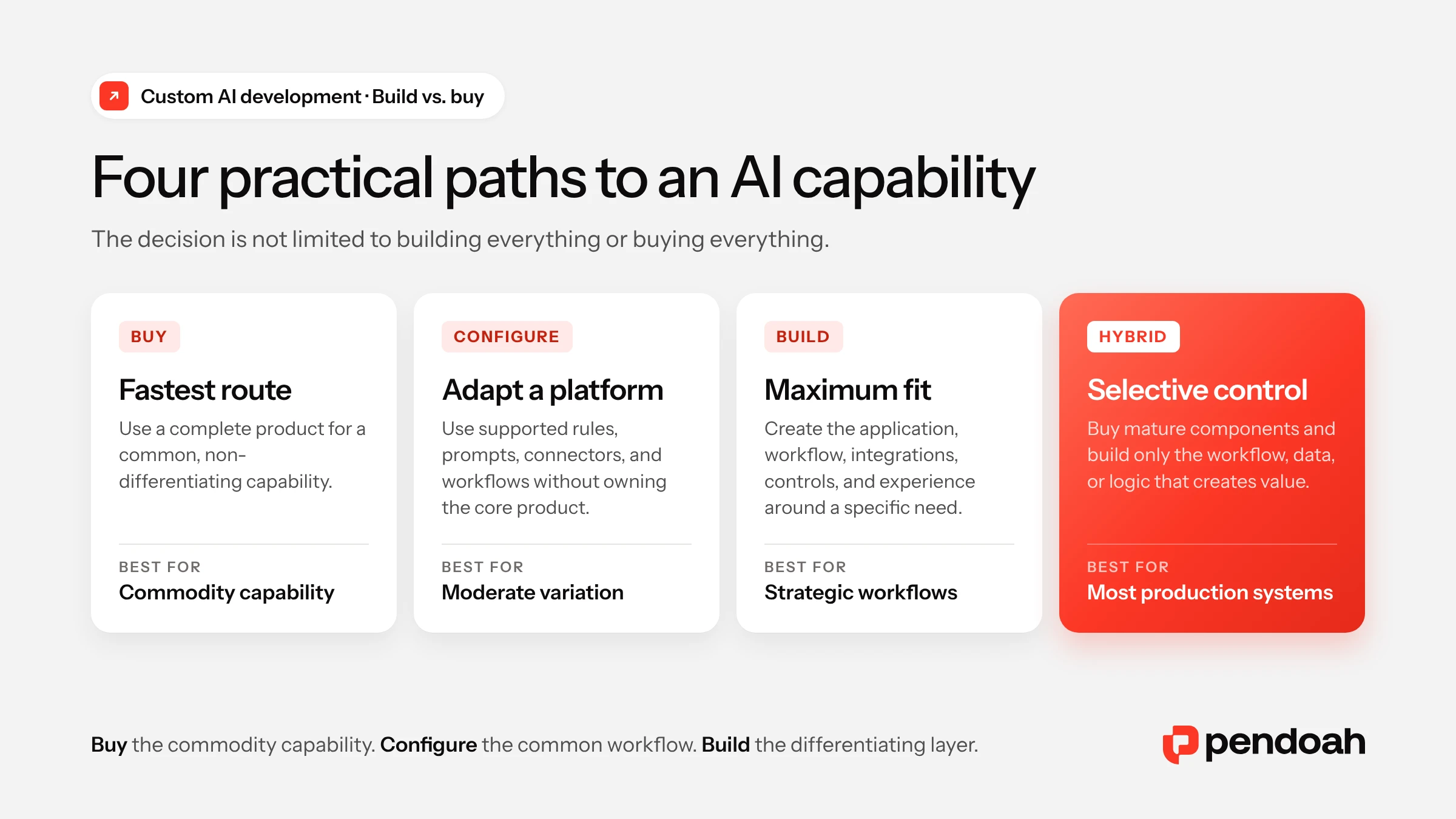
The answer is rarely all-build or all-buy. Mid-market teams usually choose among four options:
- Buy a packaged AI product
- Configure an existing platform
- Build a custom AI system
- Combine purchased components with custom development
The right mix depends on where the organization needs speed, where it needs control, and which parts of the workflow create real competitive or operational value.
What Custom AI Development Actually Means
Custom AI development is the design and construction of an AI-enabled system around an organization’s specific workflows, data, users, integrations, controls, and business objectives.
It can combine commercial or open-source foundation models, custom machine learning models, retrieval-augmented generation, deterministic rules, external APIs, cloud services, custom interfaces, proprietary data, and human approval steps.
Custom rarely means training a model from scratch; most mid-market organizations never need a new foundation model.
Instead, proven models and cloud services serve as building blocks. The development effort goes into the application, workflow logic, data architecture, integrations, security, evaluation, and operating controls that make those components useful inside the business.
Take a custom document-processing platform. A commercial model may handle extraction, yet the organization still needs software to receive documents, recognize their type, validate fields, apply rules, detect duplicates, route exceptions, update systems of record, keep an audit trail, and track accuracy and cost.
In that setup, the model is bought and the operational capability is built.
Pendoah’s Custom AI Development service follows this pattern: models and infrastructure are chosen per use case, and the surrounding system is designed around the client’s workflow, data, security requirements, and target operating outcome.
The Four Ways to Acquire an AI Capability
The usual build-versus-buy framing leaves out two options. Mid-market teams should compare four.
1. Buy
A buyer purchases a complete AI product built for a common problem. The vendor owns the product, core architecture, model choices, release schedule, and roadmap; the client configures users, permissions, data connections, and basic settings.
This path is strongest when the capability is mature, common across industries, and not a source of competitive advantage.
2. Configure
Here the organization adopts an existing platform and adapts it through supported workflows, rules, prompts, connectors, templates, or low-code tools. That adds flexibility while keeping the platform’s core constraints.
It works when the platform supports the main workflow and the remaining differences fit without extensive workarounds.
3. Build
A dedicated AI application or platform is created for a specific operational need. The work can span product design, user experience, data engineering, model selection, AI orchestration, integrations, security, monitoring, governance, and deployment.
Building gives the most control over how the capability works and evolves, along with full responsibility for running it.
4. Use a Hybrid Architecture
Proven infrastructure or model services are bought, and the differentiating workflow is built around them. A typical hybrid stack might pair a commercial model, managed database, purchased identity service, and existing CRM with a custom application, proprietary retrieval logic, industry-specific validation rules, custom integrations, and a client-owned monitoring layer.
For many production systems, this is the most practical option: speed where commercial tools are mature, control where the workflow, data, or customer experience is unique.
Custom AI Development vs. Off-the-Shelf AI
| Decision area | Buy | Configure | Build | Hybrid |
|---|---|---|---|---|
| Initial speed | Fastest | Fast | Slower initially | Moderate |
| Upfront cost | Usually lower | Low to moderate | Usually higher | Moderate |
| Workflow fit | Standardized | Partially adaptable | Designed for the exact process | Custom where needed |
| Data control | Vendor-dependent | Platform-dependent | High | Designed selectively |
| Integration flexibility | Supported connectors | Moderate | High | High around critical systems |
| Compliance flexibility | Vendor controls | Platform controls | Designed to requirement | Shared across layers |
| User experience | Vendor-defined | Configurable within limits | Fully controlled | Custom experience |
| Model choice | Vendor-controlled | Usually limited | Flexible | Flexible within selected components |
| Maintenance | Mostly vendor | Shared | Mostly organization | Shared |
| Differentiation | Low | Moderate | High | High |
| Best use | Commodity capability | Common workflow with variation | Strategic or specialized workflow | Differentiation built on proven components |
No column wins by default. A purchased system that handles 90% of a non-differentiating workflow, for example, may deliver better ROI than a custom build. By contrast, a product that covers only the easy 60% of a core workflow can add more manual work, risk, and technical debt than it removes.
Two External Signals Worth Using
Two external figures frame the decision: how widely AI is used compared with how often it scales, and how much executives now value proprietary data.
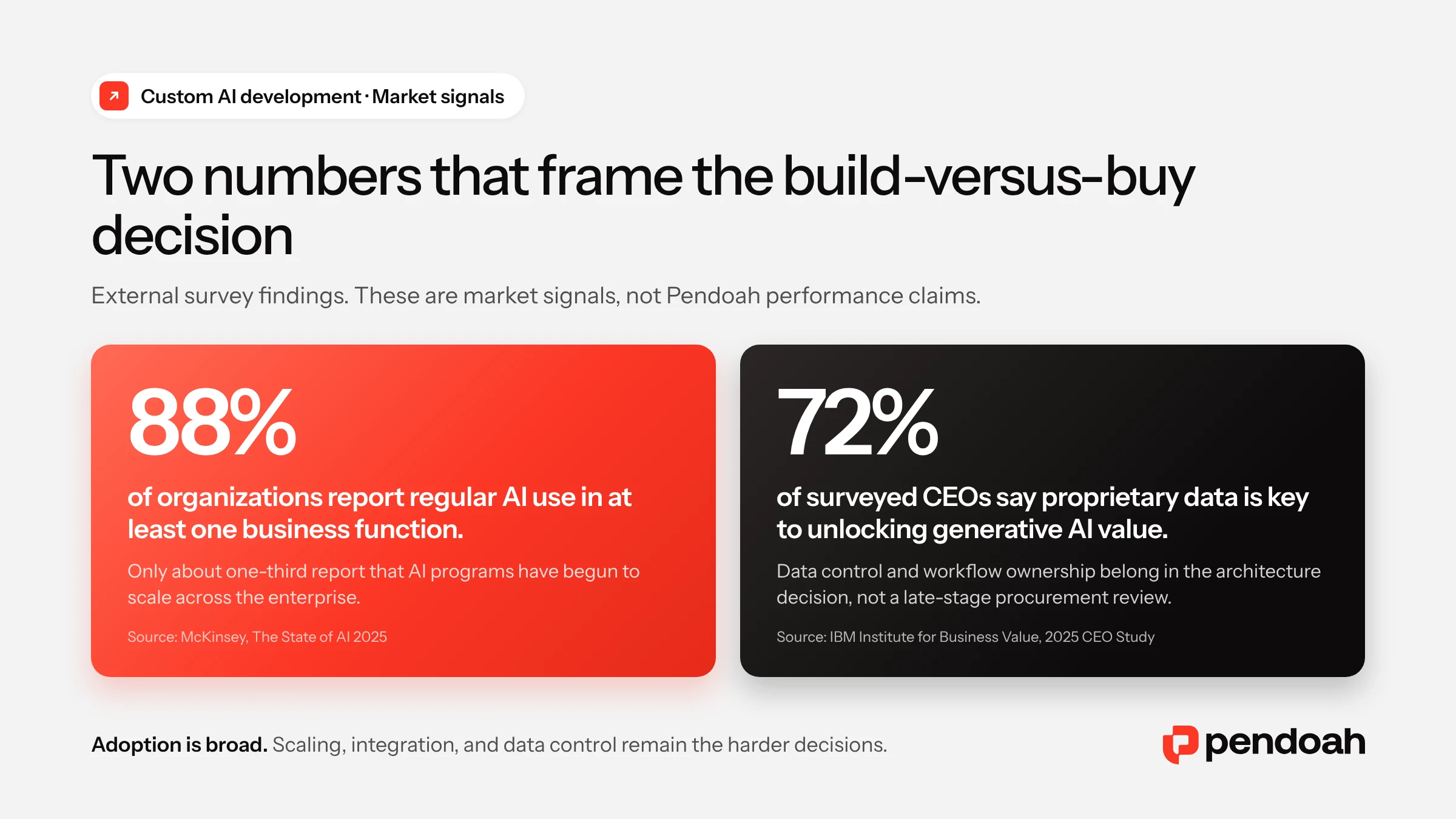
In McKinsey’s 2025 State of AI survey, 88% of respondents say their organizations use AI in at least one business function, yet only about one-third report that their companies have begun scaling AI. Architecture, integration, governance, and operating ownership decide which side of that gap a project lands on.
IBM’s 2025 CEO Study adds that 72% of surveyed CEOs see proprietary data as key to unlocking generative AI value, which puts data rights, access, portability, security, and fit at the center of the decision.
Do not compare product demos before mapping the workflow. A focused readiness assessment can identify which capabilities are commodity, which create differentiation, where data or integration gaps exist, and which option has the strongest three-year economics. Start an AI Readiness Assessment
One Workflow, Four Different Decisions
To see how the four options differ in practice, take one workflow: a mid-market construction company processing invoices, field logs, and compliance certificates.
Buy
A standard document-processing product extracts common invoice fields and exports them to a spreadsheet. That can be enough when formats are consistent, industry rules are limited, integrations are simple, and human review is acceptable.
Configure
A document platform gets custom fields, approval rules, and accounting connectors. This suits teams whose document types and rules fit the platform’s configuration model and who can work inside the vendor’s interface.
Build
A dedicated system is built around how field and office teams already work. It receives documents by email, recognizes document types, extracts industry-specific fields, applies construction codes, detects duplicates, tracks insurance expiration, routes exceptions, integrates with accounting and project systems, and keeps a complete audit trail.
Hybrid
A commercial model handles document understanding and managed cloud services provide hosting. Custom software covers email ingestion, validation, industry codes, duplicate detection, review queues, user roles, and integrations.
Pendoah’s Worklighter case study follows this hybrid pattern, running AI extraction inside an email-native construction workflow. According to the published case study, 90% of invoices are auto-processed, with exceptions held in a human-review queue.
The model capability was available to buy; the operational advantage came from the custom workflow built around it.
When Does Buying an AI Product Make Sense?
Buy when the business need is common and an available product fits it closely. Typical signals:
- The workflow is not a competitive differentiator
- The vendor already solves the problem at scale
- Required integrations are supported
- Security and compliance requirements can be satisfied
- The product can be adopted without major process distortion
- The vendor’s pricing remains acceptable at expected volume
- The organization lacks the capacity to operate custom software
- Speed matters more than exact workflow fit
- Switching costs remain manageable
Mature vendors often bring better benchmark data, more edge-case experience, established integrations, regular security reviews, and lower unit costs, advantages that are rarely worth rebuilding.
Strong buying candidates include standard transcription, general translation, commodity OCR, common productivity assistance, routine coding assistance, and basic marketing-content generation.
When Configuring an Existing Platform Is Enough
Configuration sits between a fixed product and a full build. It fits cases where the underlying capability is common but the organization needs moderate control over workflow and data. Typical configuration work includes:
- Custom prompts and internal knowledge sources
- Field mappings and approval thresholds
- Workflow rules and templates
- Role-based permissions
- Low-code screens and supported connectors
- Reporting and notification logic
It is usually enough when the platform supports the core workflow, the vendor’s data model fits, governance requirements can be enforced, interface constraints are acceptable, and data export stays practical.
The risk is configuration that turns into hidden custom development. Hundreds of platform-specific rules, scripts, prompts, and workarounds can bring the complexity of a custom system without its architectural control.
When Should You Build Custom AI Instead of Buying?
Custom development becomes a serious option when a packaged system can’t adequately handle the workflow, data, controls, integrations, or user experience. Seven situations make the case.
The Workflow Creates Competitive Advantage
When a process reflects how the organization serves customers, manages risk, prices work, makes decisions, or delivers its product, forcing it into a standard platform can erase what makes the operation valuable.
The Data Is Unique
Proprietary transactions, internal policies, domain documents, product data, expert-reviewed outputs, and industry taxonomies improve both usefulness and defensibility. Such data can justify a custom retrieval, validation, recommendation, or workflow layer even on top of a commercial model.
Integration Is Central to the Outcome
AI output creates value only if it can retrieve live records, apply rules, trigger actions, update systems of record, preserve approvals, record evidence, and return results to the user’s normal interface. Our guide to legacy API integration patterns covers the common approaches.
Compliance Shapes the Architecture
Some organizations need control over data location, retention, access, validation, auditability, human review, or model-provider usage. Custom architecture supports more specific controls, though compliance responsibility stays with the organization. In healthcare, see how HIPAA and FDA requirements for AI development shape these choices.
The User Experience Must Match the Work
Employees or customers may need structured inputs, evidence panels, document previews, approval queues, confidence indicators, editable outputs, role-specific views, workflow status, exports, and alerts, which a generic chat window rarely provides.
Vendor Economics Do Not Scale
Per-user, per-document, token, storage, premium-connector, security, and support charges can reshape the economics at production volume. When usage is high and the organization can run the system efficiently, custom development may cost less over time.
Roadmap Control Matters
Vendors can remove features, swap models, change pricing, restrict integrations, or shift focus to another market. Building gives more control over release timing and product direction, although external dependencies remain.
Why Hybrid AI Architecture Is Often the Strongest Answer
Most production AI systems mix purchased and custom components, because building every layer is slow and expensive while buying every layer often means poor fit and heavy dependency.
Commonly bought: foundation-model APIs, cloud infrastructure, identity services, managed databases, vector search, monitoring, payments, email delivery, OCR, and speech recognition.
Commonly built: workflow logic, domain-specific retrieval, validation rules, integrations, user interfaces, human-review queues, evaluation datasets, policy controls, reporting, and proprietary recommendation logic.
Keep the boundaries replaceable. Model providers should be swappable where practical, data should stay exportable, and business logic shouldn’t be buried in one vendor’s workflow engine unless that dependency is a deliberate choice.
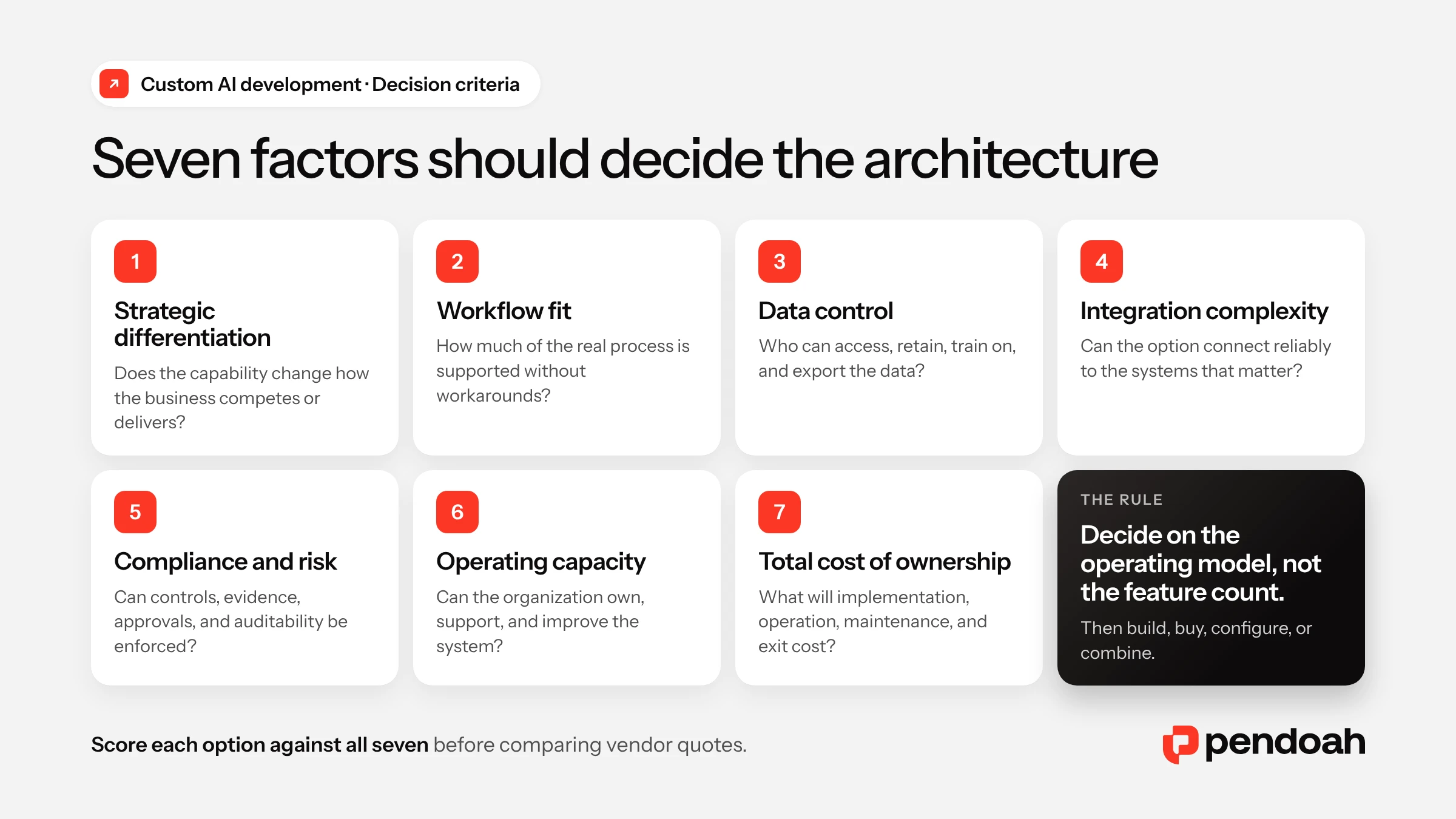
Seven Factors That Should Drive the Decision
1. Strategic Differentiation
Does the capability help the organization operate in a meaningfully different way? Common capabilities favor buying. Custom development gains ground when the workflow affects customer experience, delivery speed, risk management, pricing, product capability, or operating margin.
2. Workflow Fit
Document the required steps, systems, decisions, exceptions, approvals, users, inputs, outputs, and failure paths, then score each option against that real process. The 20% a product doesn’t support may hold the most regulated, expensive, or differentiating work.
3. Data Control and Suitability
Assess data availability, quality, ownership, sensitivity, retention, residency, vendor training policies, exportability, lineage, and historical coverage. How a vendor handles data matters as much as what its product can generate.
4. Integration Complexity
List every required integration and check whether the product offers supported connectors, documented APIs, webhooks, bulk export, real-time access, role-aware authentication, error handling, sandbox environments, and audit logs.
5. Compliance and Risk
Compare data access, encryption, retention, audit logs, human review, incident response, subprocessors, validation, change control, and regulatory evidence. A custom build offers more implementation control but shifts more responsibility to the organization and its development partner.
6. Internal Operating Capacity
Someone has to own custom software after launch, with named responsibility for product decisions, data quality, access, monitoring, incident response, change approval, budget, support, and roadmap. A purchased platform shifts more maintenance to the vendor, but adoption, data governance, and business outcomes still sit with the client.
7. Total Cost of Ownership
Compare costs over a realistic operating period, ideally three years or more, covering implementation, licenses, usage, cloud infrastructure, data work, integration, security, administration, monitoring, maintenance, support, future enhancements, and exit.
How to Calculate the Real Total Cost of Ownership
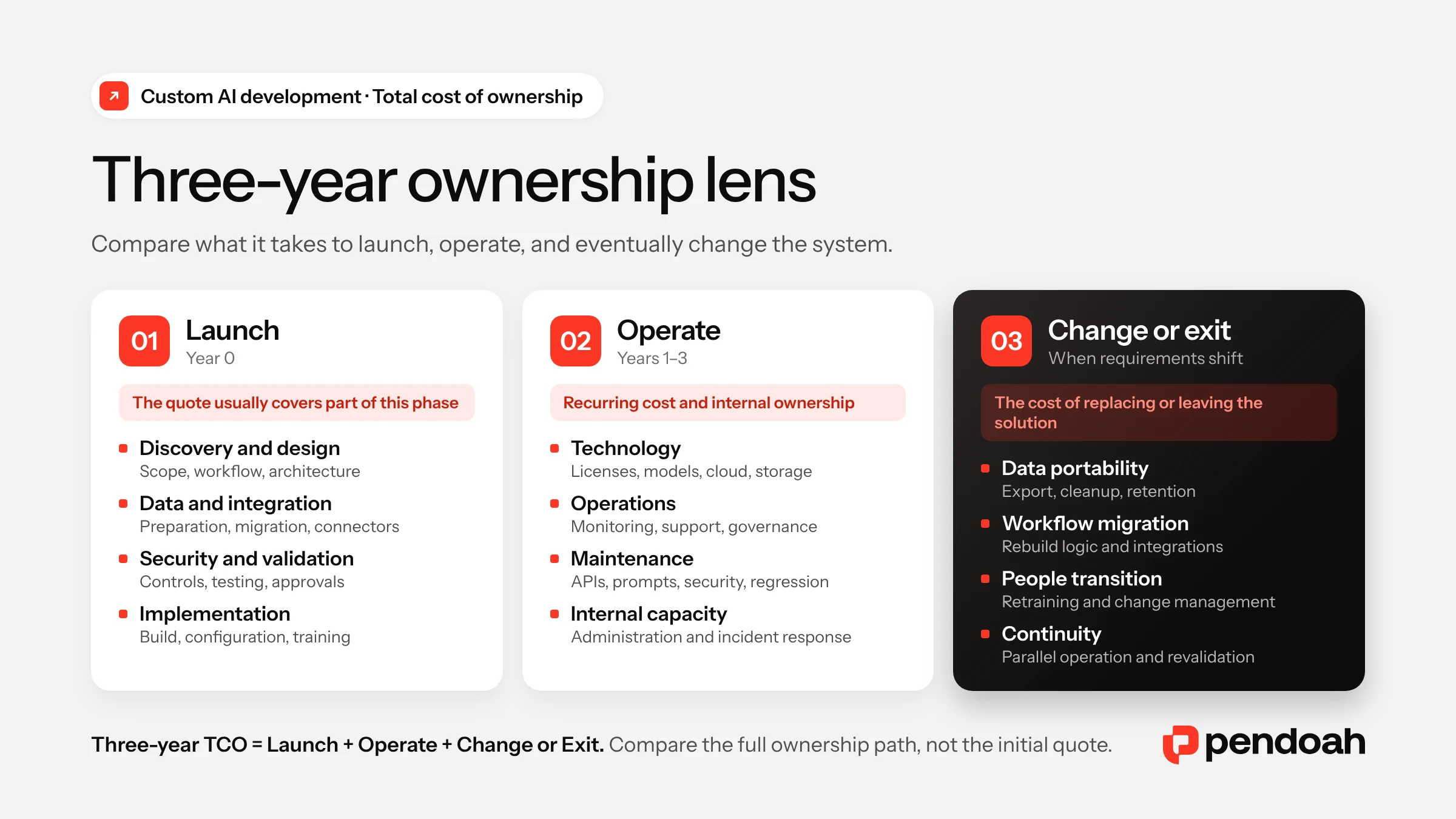
The purchase price is only the visible layer. Integration, operations, maintenance, and switching costs often decide which option is stronger over time.
Three-year total cost of ownership = initial implementation + recurring technology + internal operating cost + maintenance + expected switching or exit cost.
Initial Implementation Cost
- Discovery and procurement
- Configuration or development
- Data preparation and migration
- Integration and testing
- Security assessment
- Deployment and training
Recurring Technology Cost
- Licenses and model usage
- Cloud infrastructure and storage
- Databases, monitoring, and connectors
- Support plans and security tools
Internal Operating Cost
- Administration and data management
- User support and evaluation
- Governance and vendor oversight
- Incident response and change management
Maintenance Cost
- Software and API updates
- Model, prompt, and retrieval changes
- Security patches and performance optimization
- Regression testing and new data requirements
Switching and Exit Cost
- Data export and migration
- Rebuilding integrations and workflows
- Retraining users
- Parallel operation and revalidation
- Contract termination and transition support
The lowest initial quote doesn’t guarantee the lowest total cost. The strongest financial option delivers the required outcome at an acceptable lifetime cost and risk level.
A Practical Build-vs.-Buy Decision Process
1. Define the Outcome
Name what needs to improve, such as processing time, support capacity, validation speed, data access, exception volume, or compliance preparation, before naming any technology.
2. Map the Workflow
Record the trigger, inputs, systems, decisions, exceptions, users, approvals, outputs, and performance baseline. That map becomes the yardstick for every product and custom option. If the process itself needs fixing first, settle BPM before BPA.
3. Separate Commodity Work From Differentiating Work
Flag the capabilities that are common across the market, then identify what is unique to the organization. Commodity work is a strong buying candidate; differentiating work deserves a closer look at configuration or custom development.
4. Screen the Market
Score every product against the same requirements matrix: functional fit, data policy, security, compliance, integration, cost, exportability, support, roadmap, and exit terms. For agent products, our AI agent development buyer’s guide lists the questions to put to vendors.
5. Test the Riskiest Assumption
Use a pilot to answer the question most likely to change the decision, whether that’s accuracy on real data, legacy integration, security fit, user adoption, exception reduction, or usage economics at production scale.
6. Compare Three-Year Economics
Model all four options with conservative assumptions, then stress-test lower volume, higher usage cost, longer development, more complex integration, heavier maintenance, and vendor price changes. Our guide to building an automation ROI business case shows how to structure the scenarios.
7. Record and Revisit the Decision
Write down why the chosen option won, which assumptions it relied on, which risks remain, what would change the choice, and when the decision will be reviewed.
Red Flags That Lead to the Wrong Decision
Buying Based on the Demonstration
Demos show a product at its best. Require testing with your own data, workflow, roles, integrations, edge cases, and security requirements.
Building to Avoid Every Vendor Dependency
Custom systems still depend on cloud platforms, models, frameworks, libraries, and skilled people. Aim for controlled dependency rather than complete independence.
Treating Custom as Automatically Better
A custom build can improve fit, but it also brings longer time to value, higher initial cost, maintenance work, talent dependency, technical debt, and security responsibility. It needs a clear business reason.
Ignoring the Hybrid Option
Commercial models, cloud services, open-source frameworks, and managed infrastructure can shrink the custom scope while keeping control of the differentiating layer.
Underestimating Configuration Complexity
A platform carrying hundreds of custom rules behaves like custom software, yet the organization stays bound by the platform’s limits while shouldering the maintenance.
Comparing Only Year-One Cost
A low license price can grow expensive at scale, and a large build cost can pay off over time. A three-year analysis gives a sounder basis than the initial price.
Ignoring Exit Terms
Before signing, review data export and format, APIs, workflow portability, prompt and custom-code ownership, deletion commitments, transition support, and termination fees.
Building Without an Operating Owner
A development partner can build and support the system, but the client still needs accountable business and technical owners.
Pendoah Examples: Where Custom Development Created Value
Four Pendoah production systems show why organizations choose custom or hybrid development.
ProVal AI: Compliance Workflow as the Product
A generic writing assistant could draft documents but not run a full regulated validation workflow. That required expert-reviewed templates, document generation, risk assessment, domain retrieval, access controls, audit logs, subscription logic, security, human review, and production monitoring.
The ProVal AI case study reports 65% faster validation cycles, 40% fewer review iterations, and 30% compliance cost savings. The foundation model was one component; workflow, controls, and product design created the differentiating value.
StatSafe: Custom Control Around a Commercial Model
General AI assistants can write SQL, but StatSafe’s production requirement went further: schema-aware retrieval, validation, sanitization, audit logging, private deployment, human feedback, role-aware access, monitoring, and system integration.
According to the StatSafe case study, the platform reached 92% query accuracy and cut SQL support tickets by 85%. No new language model was needed, only a controlled application around an existing one.
Worklighter: Workflow Fit Over Generic Document AI
Generic document AI could extract text. Worklighter needed construction document types, cost codes, workers’ compensation codes, duplicate detection, approval rules, insurance-expiration tracking, human exception handling, email ingestion, and operational dashboards.
Results from the Worklighter case study: 90% invoice automation, with fewer than 20% of documents needing human review. The architecture paired purchased AI infrastructure with custom industry logic and workflow design.
Inquiry Agent: Custom Integration Across Support Systems
Standard chatbot products can draft replies. Inquiry Agent’s production platform also needed email monitoring, commerce data, shipment tracking, intent detection, response generation, guardrails, human feedback, multi-tenant architecture, role controls, and analytics.
The Inquiry Agent case study shows how custom integration turns a conversational model into a support operations system.
See more examples in Pendoah’s AI case study library.
Define the right level of custom development before funding the build. Pendoah can compare packaged, configured, custom, and hybrid options against your workflow, data, integration, compliance, and three-year operating cost. The output is a scoped recommendation, not a technology-first sales pitch. Discuss Your Custom AI Architecture
Questions to Ask Before Choosing Custom AI Development
- Is this workflow strategically important or operationally distinctive?
- Does an existing product solve the same problem with similar data?
- Which requirements cannot be met through supported configuration?
- Which components can be purchased safely?
- Which components should remain under our control?
- Does the system need proprietary organizational data?
- Which integrations are required?
- Who owns the code, prompts, models, data, and outputs?
- What is the three-year total cost?
- Which outcome will prove the decision was correct?
The Bottom Line on Custom AI Development
Neither building nor buying should be the default. Let the workflow decide.
Buy when the capability is common and the product fits. Configure when the core platform works and the remaining differences are manageable. Build when the workflow, data, integration, control, or experience creates meaningful business value. Go hybrid when commercial components can supply speed and custom development can supply differentiation.
Pendoah designs custom and hybrid AI systems around real operating constraints. Review Custom AI Development, explore broader AI Development Services, or begin with an AI Readiness Assessment before selecting the architecture.