Say you want to build a mobile app for your business and expect customers to book from their phones. Your development partner will ask you first whether you want an iPhone app, an Android app, or both.
Your choice matters because US phone users split almost evenly. According to StatCounter, iOS held 51.96% of US mobile web traffic in October 2026 and Android held 48.02%, so skipping either platform leaves out about half your potential customers.
Cross-platform mobile development is how you cover both without paying for two separate builds.
This guide explains how it works and which frameworks are worth a look, then compares it with native and covers cost. The guide then helps you choose and shows how we build one at Pendoah.
What Is Cross-Platform Mobile Development?
Cross-platform mobile development means building an app for both iOS and Android from a shared codebase. The codebase is the source code the team writes and maintains, so logic such as authentication, pricing rules, and data validation gets written and tested once.
The older approach is native development: Swift for iPhone and Kotlin for Android, built as two separate apps. Native apps feel at home on their own phones, but most of the work happens twice.
A third term you’ll hear is hybrid app development. A hybrid app uses web technology for its screens, which is how Ionic works, and it counts as one kind of cross-platform development. Frameworks such as Flutter and React Native work differently.
How Cross-Platform Apps Work
A cross-platform app has two layers. The shared code holds the application logic, and a framework turns that code into an app each platform can run.
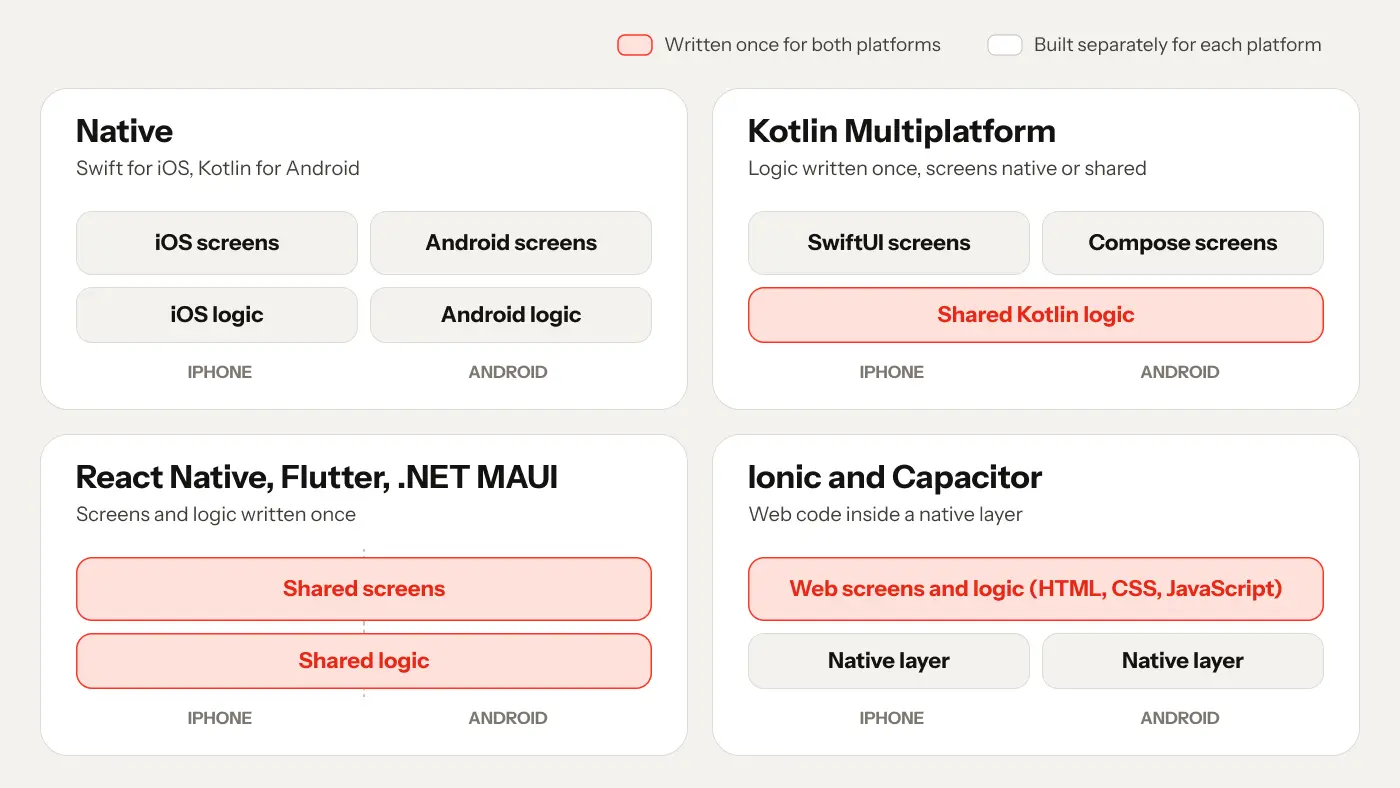
Frameworks mainly differ in how they draw the screen:
- Flutter draws every button and menu itself with its own rendering engine, so the app can look the same on both phones.
- React Native asks each phone to draw its own native components, so the app picks up the look people already know.
- Kotlin Multiplatform shares the behind-the-scenes logic and uses native screens by default, though it can share the screens too through Compose Multiplatform.
- Ionic and other hybrid tools build the screens with web technology.
Vendors like to say “one codebase, every platform.” In practice, the app shares most of its code, and a few pieces still get written separately for each platform. Push notification setup and payment sheets such as Apple Pay and Google Pay usually get small native modules, while the logic and most screens stay in the shared code.
Benefits of Cross-Platform App Development
Sharing one codebase, one design system, and one round of testing across iOS and Android cuts duplicated work. These five benefits cover cost, maintenance, and reach.
Lower Cost & a Better Return
One team, one set of designs, and one round of testing usually cost less than doing everything twice. Pendoah’s price list shows the effect:
A native iOS app starts at $15,000 and a native Android app at $20,000, which adds up to $35,000, while one cross-platform app starts at $25,000.
Faster Launch
One app takes less time to build than two, so it can go live sooner and start earning sooner.
Shared Business Logic
Business logic covers rules such as pricing and reminder scheduling. A shared codebase makes those rules behave the same way on both platforms, and a bug fix reaches iOS and Android users together.
Consistent Look & Feel
One design system and one team keep your brand and layouts the same on every device. Consistency has a catch: iPhone and Android users expect slightly different navigation, so a good team shares the design and adjusts the details for each platform. Mobile app user experience decides whether a cross-platform build earns trust, so budget real design time.
Wider Reach From Day One
Customers on either phone can use the app on launch day, and your Android users don’t wait behind your iPhone users for a second build.
Cross-Platform App Development Frameworks & Tools
Five frameworks get most of the attention, and each one fits a different team.
| Framework | Language and backer | Best fit | Apps built with it | Watch out for |
|---|---|---|---|---|
| Flutter | Dart, Google | Large, long-lived products where UI quality and consistency matter | Google Pay, BMW | Dart has a learning curve, and Flutter for web has search visibility limits |
| React Native | JavaScript with React, Meta | Teams that already know JavaScript or React | Microsoft Office, Skype | Heavy animations may need native tuning, and some features need native code |
| Kotlin Multiplatform | Kotlin, JetBrains | Shared logic with native screens by default | Cash App, Quizlet | Smaller ecosystem and more setup work |
| .NET MAUI | C# and XAML, Microsoft | Companies already built on Microsoft tools | NBC Sports Next, Azure App | Fewer libraries than Flutter or React Native |
| Ionic | JavaScript with a web framework such as Angular or React | Web teams building simpler apps | Pendoah uses it for hybrid and PWA builds | Screens are web technology, so it suits simpler apps |
Flutter suits products where a consistent, custom interface matters. Google’s December 2024 announcement cited Apptopia data showing Flutter in nearly 30% of tracked free apps in Apple’s App Store in 2024, up from about 10% in 2021. It points to a healthy ecosystem, though it doesn’t prove Flutter fits your app.
React Native suits teams that already know JavaScript or React. Version 0.76, released in October 2024, made its rebuilt internal architecture the default, which is worth knowing if you ever compare an older React Native app with a new one.
Kotlin Multiplatform suits teams that want shared logic but native screens. It reached Stable status in November 2023, and Google announced official support for sharing business logic between Android and iOS at Google I/O 2024. It fits teams with strong native Android expertise.
Around the framework sit everyday cross-platform app development tools. Xcode is Apple’s environment for developing, testing, and distributing apps for Apple platforms; Android Studio is Google’s official one for Android, and Firebase Cloud Messaging sends messages across platforms. Your developers pick the rest, and what matters to you is that the tools are standard, so a future vendor can pick the project up.
Native vs Cross-Platform Mobile App Development
Native gives you the most control over each phone, and cross-platform gives you the most reach for the money. The better pick depends on what your app has to do.
| Native (two apps) | Cross-platform (one app) | |
|---|---|---|
| Codebase | Two separate ones, Swift and Kotlin | One shared codebase, plus small native pieces where needed |
| Cost | Higher, since design and testing happen twice | Lower for most apps, since one build covers both phones |
| Launch speed | Slower, with two builds to finish | Faster, since one team ships both |
| Performance | Full access to the phone’s graphics and hardware | Plenty for most business apps; heavy graphics may need native code |
| New phone features | Direct access to everything the platform offers | Some features can need extra native code |
| Look and feel | Fully platform-specific | Shared design with platform tweaks |
| Maintenance | Two apps to update and test | One codebase, though you still test on both phones |
| Best for | Heavy graphics and deep device features | Booking and ordering apps, plus most other business apps |
Cross-Platform App Development Cost
Pendoah’s cross-platform app development apps start at $25,000, and the final price depends on how many platforms and features you need.
Our starting prices give you a baseline:
| App type | Starting price | Good fit when |
|---|---|---|
| Native iOS (Swift) | $15,000 | All your customers use iPhones |
| Native Android (Kotlin) | $20,000 | All your customers use Android |
| Cross-platform (Flutter or React Native) | $25,000 | You need both phones covered |
| Progressive web app (PWA) | $7,000 | You don’t need the app stores |
What Influences the Cost
- The number of features, and how complex each one is.
- The phones and platforms you target.
- Integrations with payments or your CRM.
- The backend: where data lives and who can see it.
- Security and compliance needs. We identify these before development and support work toward HIPAA, GDPR, CCPA and PCI DSS where they apply. Our guide to healthcare app development covers the HIPAA side in more detail.
Which Approach Should You Choose?
The right approach depends on what the app has to do and who will maintain it. This checklist covers both.
Pick cross-platform if most of these are true:
- You need iPhone and Android customers covered at launch and can’t fund two builds.
- The app is mostly screens and forms, with payments on top, which describes most booking and ordering apps.
- You want to test an idea with real users before you spend more, and our MVP Prioritization Framework covers what to build first.
- One small team will maintain the app after launch.
Pick native, or at least talk to a developer first, if any of these are true:
- The app needs heavy graphics, such as a game or augmented reality.
- It depends on deep device features, such as custom Bluetooth hardware or advanced camera processing.
- You want to adopt Apple’s or Google’s newest features the moment they launch.
- All of your customers use one platform, such as an internal tool for a company that only issues iPhones.
Cross-platform is the usual default for apps built around screens, forms, and payments, and the native list above covers the exceptions.
If you don’t need the app stores at all, a progressive web app (PWA), which runs in the phone’s browser, can cost less still. Pendoah’s price list starts PWAs at $7,000.
How Pendoah Builds a Cross-Platform App
The mobile application development process for a cross-platform app has eight steps, the same as any other app. The framework choice comes early, and the first four steps happen before the main build starts.
Strategy & Discovery
Workshops with your team, user interviews, and a competitor review, written up as a Product Requirements Document (PRD), a plain list of what the app must do.
MVP Planning & Scoping
We rank features by value and effort, then recommend platforms, a timeline, and a budget, including whether cross-platform fits.
UX & UI Design
Screen designs and a clickable prototype you can tap through before the app exists.
Backend & Integration Planning
Secure data storage and logins, plus connections to your CRM or payment systems.
The last four steps are where the app takes shape.
Development
Four- to-six-week cycles with the riskiest features first, and a working app after each cycle.
Testing & QA
Real devices, weak networks, interruptions and heavy load.
Launch & Store Submission
Store listings and privacy disclosures, then submission, though approval is up to Apple and Google.
Post-launch Support
30 days of free support for crashes and OS updates.